Pepper & Carrot AI-powered flipbook · Part 1 — Chunking a Webcomic for RAG: When Your Chunks Are Comic Pages (Series Trailer)
Series introduction for the Pepper & Carrot AI-powered flipbook — a page-aware, spoiler-safe RAG app for a hand-drawn webcomic that runs locally on a laptop or on a five-piece free-tier cloud deploy. What it is, why it's a different problem from chat-with-PDF, and what each post in the series builds.
A series introduction for an AI-powered flipbook built around the hand-drawn webcomic Pepper & Carrot — page-aware chat, spoiler-safe retrieval, and a knowledge graph that grows as you read. Runs locally on a laptop or on a five-piece free-tier cloud deploy.
What you’ll get from this post. A clear picture of what we’re building across the series, a 20-second walkthrough of the running app, the architecture in one diagram, and the two ideas that hold the whole thing together. No code yet — the next fifteen posts handle the build, one slice at a time.
Prerequisites. None. You can read this on a phone with a coffee. Subsequent posts will assume you can run
docker compose upandnpm install, but this one doesn’t.
Table of Contents
- The Premise
- See It Running
- What the App Actually Does
- The Architecture in One Picture
- Two Ideas That Hold Everything Together
- The Stack at a Glance
- The Series: What Each Post Builds
- What You’ll Have Learned by the End
- Key Takeaways
The Premise
Most “chat with X” demos sit on top of a pile of text: PDFs, docs, transcripts, web pages. The interesting cases start when X isn’t text. I covered one of those in my last post — applying Anthropic’s Contextual Retrieval to a personal photo library, where each chunk is a single picture.
This time it’s a different shape of the same problem: a hand-drawn webcomic. Each chunk is a page of comic art the reader is currently looking at, inside a flipbook UI that flips like a real book and tells the AI which page is visible. Three things make this harder than chat-with-PDF:
- It’s visual. There is no native text to retrieve over. You have to describe every page into prose before any RAG technique can touch it, which raises a real architectural question about who does the describing, and when.
- It’s sequential. Page order carries plot. “Spoiler” is a meaningful semantic property: the chat layer must structurally refuse to pull from any page the reader hasn’t reached yet, no matter how cleverly the question is phrased.
- It’s paged. The page (or two-page spread) is the unit of context, not a paragraph or a “section.” A real page-flipping UI turns “what page am I on” into a first-class runtime signal the chat layer can ground in.
The comic in question is Pepper & Carrot, made by French illustrator David Revoy: a young witch and her cat get into trouble across 40+ episodes of stunning watercolor-style panels. The whole thing is licensed CC BY 4.0, which means anyone can build on top of it as long as the author is credited.
I wanted a reading experience that did one specific thing: as you flip through the pages, you can ask questions about what you’re looking at — who is this character, why is the cat angry, what just happened on the previous page — and the AI knows exactly which page you’re on, and refuses to spoil anything past it.
To pull that off you need:
- A real reading UI that knows which page (or two-page spread) is visible.
- A page-aware chat layer grounded in only the pages you’ve already read, plus optionally a wiki of universe lore.
- A retrieval system structured so spoilers can’t leak even if the model tries to be helpful.
- A second mode for “tell me about the world itself” questions, separated cleanly from page questions so the answer style stays focused.
- A bonus: a knowledge graph of characters, places, and covens that reveals itself as you read further into the comic.
This is a sixteen-part series about how I built that, end to end, from the first docker compose up on my laptop through a public deployment on free- and low-cost cloud services. The audience I had in mind: someone who has read about RAG and “AI agents” but hasn’t yet built a full-stack app where the AI is a feature, not the whole product.
A note on the source code and live demo. Code lands in two repos. A workshop starter at https://github.com/bearbearyu1223/pepper-carrot-companion-workshop reproduces Posts 2–4 — the setup, the data model, and the provider abstractions — end-to-end, published alongside those posts. The full project repository plus a live-demo URL go up alongside the deploy guide near the end, so the full source and the cloud walkthrough land together rather than as a half-explained skeleton. Each post in between is self-contained, with the code inline and screenshots / GIFs of the running app.
Checking out the code. The workshop starter is tagged per checkpoint. Several posts share a checkpoint where they tour different parts of the same code — Posts 2–4 all live at
post-02-04-starter(git checkout post-02-04-startergives a complete tree for the setup, the data model, and the provider abstractions). Later steps add their own tags (post-05-06-ingestion,post-07-08-fullstack,post-09-rag, …); each post names the exact tag to check out. See the README’s Following along with the blog series.
See It Running
The live demo URL will go up alongside the deploy guide (Post 15) — once that post is published, this section will get the public link to a running instance you can play with. For now, here’s a 20-second walkthrough of the same app running locally:
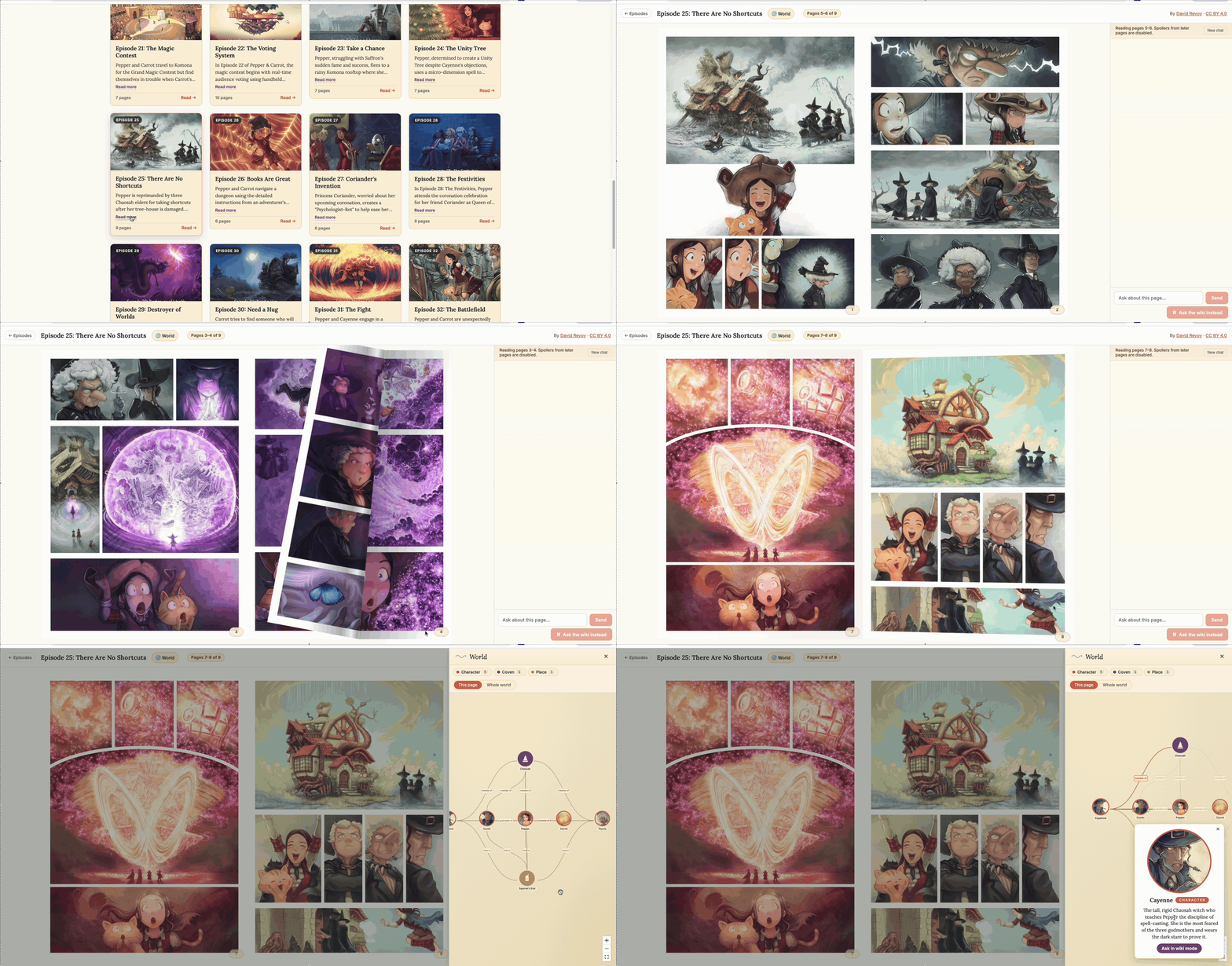 A live walkthrough of the Pepper & Carrot AI-powered flipbook — opening an episode, flipping pages, and chatting with the page-aware AI. (Click to enlarge.)
A few honest words about what to expect when the live link does go up. The cloud deploy is engineered for cost, not snappiness: both the FastAPI backend (on Fly.io) and the language model server (on Modal) scale to zero when nobody is using them. That means the first request after a period of idleness pays for waking the machines back up:
- Fly boots a small Firecracker VM (~5–10 seconds).
- Modal allocates a GPU and loads the model weights into VRAM (~30–75 seconds for
qwen2.5:7bplus an embedding model).
So the first chat message after a quiet period might take a minute. After that, it’s quick.
The app papers over this with a trick I’ll explain in the deploy post: when you open an episode, the backend fires off a fire-and-forget warmup, a tiny throwaway request to the model server in the background, before you’ve typed a thing. By the time you finish reading the cover and ask your first question, the GPU is usually already warm.
(There’s a real engineering lesson buried in this paragraph. “Make it free to host” and “make it instant” are two different design briefs. I picked the first one and designed around the consequences. The deploy post covers exactly how.)
What the App Actually Does
Three features carry the whole product:
1. A real flipbook reader
The reading view is a real page-flipping flipbook (using StPageFlip): single page in portrait, two-page spread in landscape. A small parchment-pill page indicator at the top shows you where you are. Clicking the corner of a page flips it.
The flipbook reports its orientation and current page back to a sibling chat panel on the right, so the AI always knows exactly what’s visible. This is the foundation everything else sits on.
2. Page-aware chat with two modes
The chat panel offers two question paths the user picks via UI chips:
- Page mode (warm orange chips). The AI answers grounded in the visible spread plus prior pages, with future pages structurally excluded. Use this for “who is this character?”, “why is the cat upset?”, “what happened on the page before this?”
- Wiki mode (dusky plum chips). The AI answers from a curated wiki of Pepper & Carrot universe lore — witch schools, magical concepts, named places. Use this for “what is Chaosah?” or “tell me about the Magic Sand.” Universe facts aren’t plot spoilers, so this mode skips the spoiler filter.
After every answer, the AI suggests two follow-up questions as clickable chips — one tagged for page mode, one for wiki mode. Click either and the next question fires through the right pipeline automatically.
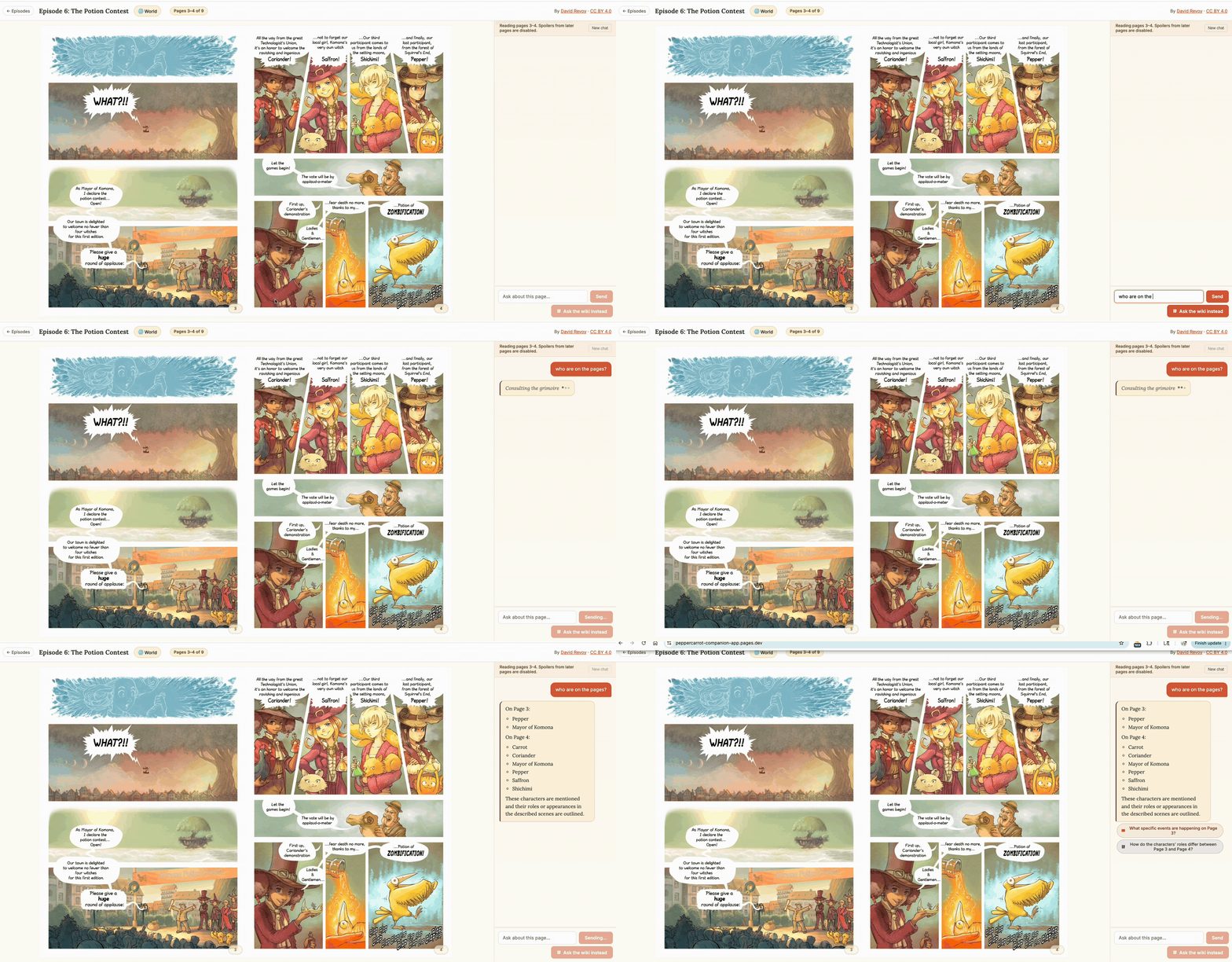 Page-aware chat with two modes — page (orange) for questions about the visible spread, wiki (plum) for universe lore. Each answer ends with two mode-tagged suggestion chips that fire the next question through the right pipeline. (Click to enlarge.)
3. A spoiler-aware world graph
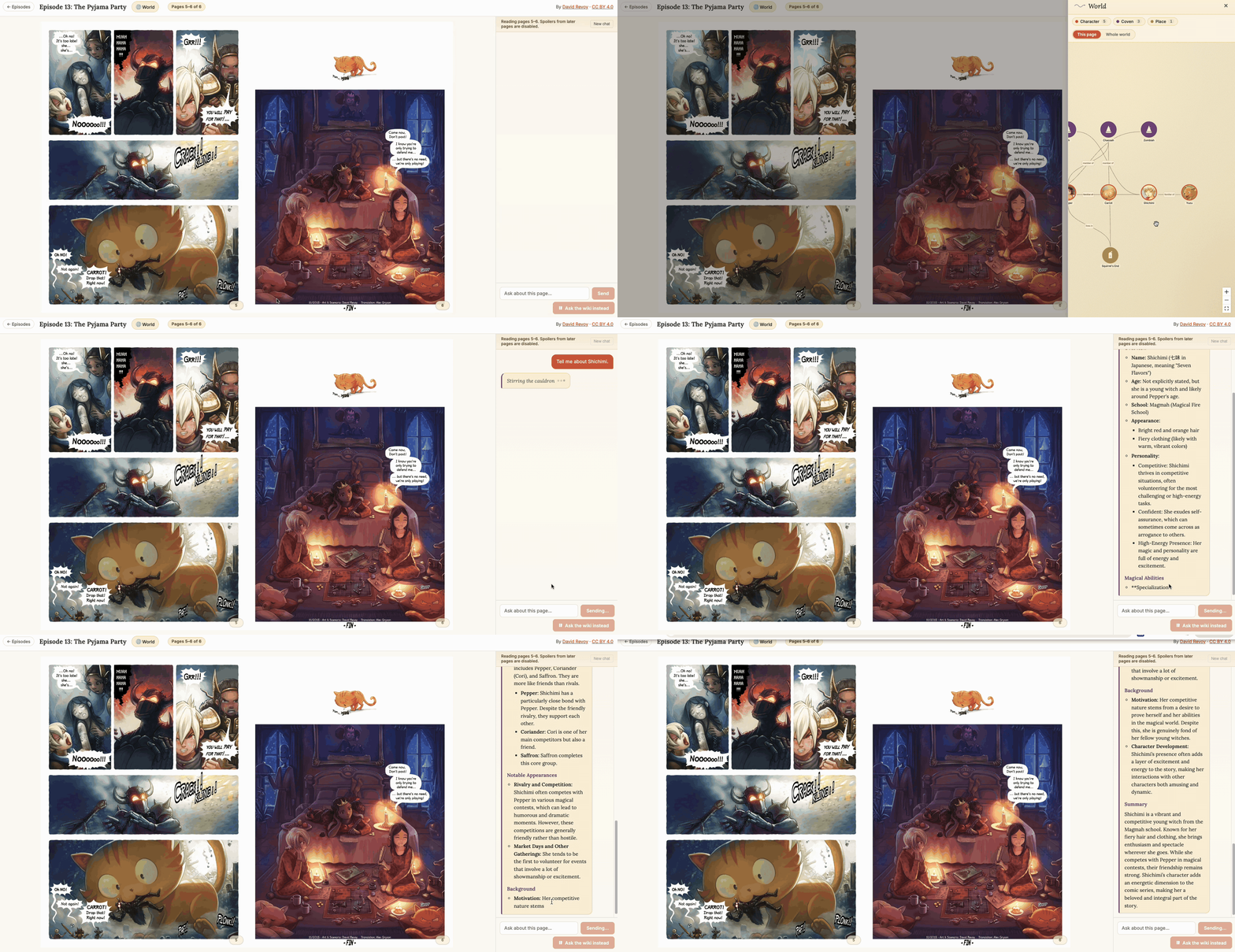 The world-graph overlay — characters, creatures, places, and covens connected by relationship edges, revealed page-by-page as you read. Click a node to open an info card with a one-tap “Ask in wiki mode” handoff. (Click to enlarge.)
Click the World chip in the reader UI and a side panel slides in showing a knowledge graph of Pepper & Carrot’s world: characters, creatures, places, witches’ covens, and the relationships between them. Avatar art comes from David Revoy’s official character pages on framagit, with graphical fallbacks for entities that don’t have art yet.
The graph is also spoiler-aware: only entities and relationships that have already debuted by your current page are shown. Click a node and you get a “Ask in wiki mode” button that pipes a starter question into the chat.
These three features together are what makes this feel like an AI-powered flipbook, where the reading and the chat are one experience grounded in the page that’s literally in front of you, rather than a generic Q&A bot stapled onto a comic viewer.
The Architecture in One Picture
Five services, each on a different free-or-cheap host, each doing the specific job it’s best at:
[diagram: five-piece deploy — Cloudflare Pages (frontend) → Fly.io (FastAPI backend) → Neon (Postgres), R2 (images), Modal (Ollama GPU)]
1
2
3
4
5
6
7
8
9
10
11
12
13
14
15
16
17
18
19
20
21
22
23
24
25
26
┌──────────────────────────┐
│  Browser                 │
│  React + StPageFlip      │
└──────────────┬───────────┘
               │ HTTPS (REST + Server-Sent Events)
               ▼
┌──────────────────────────┐         ┌──────────────────────┐
│  Cloudflare Pages        │         │  Fly.io              │
│  Static frontend (CDN)   │ ──────► │  FastAPI backend     │
└──────────────────────────┘         │  + ChromaDB (embed)  │
                                     └──────┬───────┬───────┘
                                            │       │
                          ┌─────────────────┘       └────────────────┐
                          ▼                                          ▼
                ┌────────────────────┐                     ┌────────────────────┐
                │  Neon              │                     │  Modal             │
                │  Postgres (text +  │                     │  Ollama on GPU     │
                │  metadata source   │                     │  (chat + embeds)   │
                │  of truth)         │                     └────────────────────┘
                └────────────────────┘
                          ▲
                          │
                ┌────────────────────┐
                │  Cloudflare R2     │
                │  Page images (CDN) │
                └────────────────────┘
(“CDN” on the two file-serving boxes stands for Content Delivery Network — a worldwide pool of servers that hold cached copies of static files and hand them out from a location near each visitor. Cloudflare Pages serves the prebuilt React app; R2 serves the comic page images. Neither runs any of your code — both just hand out files, which is why they’re free at portfolio traffic levels.)
A request to chat about a page roughly does this: the frontend POSTs the user’s question to the FastAPI backend → backend embeds the question (asks Modal) → backend queries ChromaDB for the top relevant page-text chunks, filtered to exclude any page the reader hasn’t reached yet → backend fetches the full text for those chunks from Neon (Postgres) → backend assembles a prompt → backend streams the answer from Modal back to the browser as Server-Sent Events.
Locally, the same code runs against docker compose Postgres, an embedded ChromaDB on disk, the local filesystem for images, and a local Ollama instance for chat and embeddings. Same code paths, different config.
That’s not an accident. It’s the first of the two ideas this whole project is built on.
Two Ideas That Hold Everything Together
If you remember nothing else from this series, remember these two.
Idea 1: Provider abstraction is mandatory
Every external service — the chat model, the embedding model, the image store — is hidden behind a Python Protocol (a typed interface). The rest of the codebase never imports an SDK directly:
1
2
3
4
5
6
7
8
# YES — what every caller sees
from app.clients.embedding import EmbeddingClient
client: EmbeddingClient = get_embedding_client(settings)
vec = await client.embed("Pepper picks up a glowing potion")

# NO — never in routes, services, or ingestion
import ollama
ollama.embeddings(...)  # leaks a vendor choice into business logic
Why this matters in practice: switching from local Ollama to the Anthropic API for chat is a one-line config change, not a refactor. Switching image storage from a local folder to Cloudflare R2 in production is a one-line config change. The same goes for the embedding model. Ten lines of Protocol boilerplate buys you a codebase that runs identically on a laptop and in the cloud.
We’ll spend an entire post on this in Post 4, because it’s the pattern that makes everything afterward composable. Most “AI demo” codebases skip this and pay for it later.
Idea 2: Spoiler safety lives at the data layer, not the prompt
Here’s the wrong way to prevent spoilers in a RAG app:
“You are an AI reading companion. Please do not reveal anything that happens after the user’s current page.”
You can write that prompt. You can write it ten different ways. And on a different day, with a different model, in a different chat context, the model will spoil things anyway. Prompt instructions are guidance, not guarantees, and a serious app cannot rely on the model’s good behavior for correctness-critical properties.
The right way is to make the spoiler structurally impossible: filter the retrieval query so the model literally never sees future pages. Concretely, every page-mode chat query attaches a where clause to the ChromaDB lookup:
1
2
3
4
5
6
7
8
9
10
11
where = {
    "$or": [
        {"episode_number": {"$lt": current_episode}},
        {
            "$and": [
                {"episode_number": current_episode},
                {"page_number": {"$lt": current_page}},
            ]
        },
    ]
}
The world graph uses the same idea, expressed in SQL with a row-value comparison, so a single line covers “any entity that debuted by this point in the story”:
1
WHERE (episode_debut, page_debut) <= (:current_episode, :current_page)
The model couldn’t spoil a future page if it tried, because that data isn’t in its prompt. This pattern (push correctness-critical filters down to the data layer; let the prompt focus on tone and synthesis) is one of the most broadly useful lessons from the project, and it shows up in Post 9 for chat retrieval and Post 12 for the world graph.
The Stack at a Glance
A single table for everyone scanning. Each row links to the tool’s official site so you can read up before the next post starts using it.
| Layer | Choice | Why |
|---|---|---|
| Frontend | React + TypeScript + Vite + StPageFlip | Standard, fast, page-flipping comes free. |
| Backend | Python 3.11 + FastAPI + SQLAlchemy 2.0 (async) | Async throughout; first-class typing. |
| Database | PostgreSQL (local Docker / Neon in cloud) | Source of truth for all text and metadata. |
| Vector store | ChromaDB (embedded, in-process) | Two collections: per-page text and wiki articles. |
| Migrations | Alembic | |
| Chat + embedding models (local) | Ollama running qwen2.5 + bge-m3 | One process, two models, no API key. |
| Chat + embedding models (cloud) | Same Ollama, hosted on Modal serverless GPU | Same HTTP API; only the URL changes. |
| Page descriptions | ingest-from-images Claude Code skill | Claude reads each page image visually and writes a JSON description next to it. More on this in Post 5. |
| Image storage | Local filesystem (dev) / Cloudflare R2 (cloud) | Both behind the same StorageClient interface. |
| Backend host (cloud) | Fly.io | Cheap Firecracker VMs that scale to zero. |
| Frontend host (cloud) | Cloudflare Pages | Free static CDN. |
| GPU host (cloud) | Modal | Serverless GPU billed by the second. |
A few terms in that table will be unfamiliar if you’re new to AI — every post defines them in plain language before using them. (Quick previews: embedding = a numeric vector that captures the meaning of a piece of content — most commonly text, but the same idea extends to images (e.g., CLIP), audio, and other modalities; pieces with similar meaning land near each other in the vector space. Vector store = a database for embeddings that supports similarity search. RAG = “retrieval-augmented generation” = retrieve-then-prompt the model.)
The Series: What Each Post Builds
Each post leaves you with a working slice. By the end of Post 15 you have the full app deployed on the public internet; Post 16 shows a no-GPU alternative deploy on managed APIs.
The series publishes one post at a time. Titles in the table below become clickable links as each post goes live; the rest are placeholders for what’s coming.
| # | Post | What you’ll have when you finish |
|---|---|---|
| 1 | When Your Chunks Are Comic Pages: An AI-Powered Flipbook for Pepper & Carrot (this post) | A clear picture of the series and a 20-second walkthrough of what you’ll be building. |
| 2 | Setting Up the Workshop: Postgres, Ollama, and a Project That Type-Checks | Local Postgres + Ollama running, a FastAPI scaffold passing mypy and ruff, and one episode downloaded — the environment every later post builds on. |
| 3 | The Data Model: Ten Tables, One Migration | The schema that mirrors the app’s features, the first Alembic migration applied, and a column-by-column tour of the SQLAlchemy models. |
| 4 | Provider Abstractions: Why Every External Service Hides Behind an Interface | A LocalStorage that works end-to-end, a SentenceTransformersEmbeddingClient producing real 1024-dim vectors, and a mental model for swapping either out without touching business logic. |
| 5 | Claude Skills as a Vision Provider: Ingesting a Comic by Reading It | A working understanding of what a Claude Code skill is, why it beats running a vision model in production, and the ingest-from-images skill that describes each page. |
| 6 | The Ingestion Pipeline: From Page JSONs to Postgres + Chroma | One full episode ingested into Postgres + Chroma + storage by the Stage-2 pipeline that consumes the skill’s page descriptions. |
| 7 | From Database to JSON: A Typed REST API | Two typed FastAPI routes that resolve relative storage keys into absolute URLs at response time — exercised with curl. |
| 8 | A Real Flipbook in the Browser: React + StPageFlip | An episode picker plus a real page-flipping flipbook rendering real data from your local backend. |
| 9 | The RAG Layer: Spoiler-Safe Retrieval Without Trusting the Prompt | A working chat pipeline that answers questions about the visible page using only the pages you’ve already read. No UI yet — you’ll exercise it with curl. |
| 10 | Streaming Chat in the Browser: SSE, React, and Schema-Constrained Suggestion Chips | End-to-end chat in the browser. Tokens stream in, follow-up suggestion chips render below each answer. |
| 11 | Making Small Models Behave: Wiki Mode and the Long Road to Concise Answers | A second retrieval mode for universe lore, plus a prompt-engineering toolkit that takes a chatty 7B model from “essay-style replies with section headers” to clean prose. |
| 12 | A World Graph Built by a Skill: Extraction and a Spoiler-Safe API | A second Claude Code skill that walks the wiki + page JSONs into a YAML graph, loaded into Postgres behind a spoiler-safe API route. |
| 13 | Rendering the World Graph: A React-Flow Overlay and Summary-First Wiki | A side-panel overlay rendering an interactive graph of characters, creatures, and places that grows as you read — plus a third skill that authors per-entity wiki summaries. |
| 14 | Going to Production: Provisioning Modal, Neon, and R2 | The five-provider architecture stood up: a GPU-served Ollama on Modal, managed Postgres on Neon, image bytes on Cloudflare R2 behind the Post 4 storage interface. |
| 15 | Shipping It: Containerize, Deploy to Fly + Pages, and Verify | A live, public URL anyone can visit. Cold-start, secrets, CORS, and a deploy you can rebuild in under ten minutes. |
| 16 | Skip the GPU: A Managed-API Deploy on Anthropic + Voyage | The same app shipped without a GPU at all — chat on the Anthropic API, embeddings on Voyage — as a config change, not a code change. |
I’ll publish them one at a time and link them back here as they go up.
What You’ll Have Learned by the End
If you read all sixteen posts and follow along on your own machine, you’ll have hands-on experience with the patterns most modern AI app codebases use:
- Async FastAPI as a backend for streaming AI responses, with Server-Sent Events for token-by-token delivery to the browser.
- RAG from the ground up — embeddings, similarity search, top-k retrieval, and what each one actually does to your retrieval quality.
- Vector stores in practice — when an embedded ChromaDB is the right call versus when you need a separate service, and how to keep your text-of-truth in Postgres while only embeddings live in Chroma.
- Spoiler-safe / permission-aware retrieval as a structural property enforced at query time, not a prompt instruction. The same pattern generalizes to any “user can only see X” constraint in a RAG app.
- Provider abstraction for AI services — running locally on Ollama for iteration speed and zero cost, swapping to a hosted provider with a config change.
- Claude Skills as a way to use Claude itself for one-shot, high-quality content generation tasks (page descriptions, knowledge graph extraction) without building a runtime vision pipeline. We use this pattern twice in the series, in different shapes.
- Structured outputs — getting reliable JSON out of small local models using schema-constrained generation, plus defensive parsing for the cases that still slip through.
- Prompt engineering for small chat models — the difference between “be concise” (which they ignore) and a prompt structure that actually produces concise answers from a 7B model.
- Serverless GPU deployment with Modal — including the cold-start problem and the warmup pattern that hides it from users.
- A free-tier-friendly cloud architecture that puts each piece on the right service: a CDN (a worldwide network of file-caching servers) for the prebuilt frontend, a scale-to-zero VM for the backend, a scale-to-zero GPU for the model, hosted Postgres for the database, and an object store for images.
If you mostly want one of those, individual posts stand alone. Post 5 is worth reading on its own if you’re curious about Claude Skills, and Posts 14–15 are worth reading on their own if you’re curious about the deploy shape.
Key Takeaways
1. AI is a feature, not the product. The whole demo is about reading a webcomic. The AI makes that better; it doesn’t replace the reading. Designing for that ordering, UX first and model second, produces very different decisions than “let’s build a chatbot.” The flipbook itself has to be good even with the chat panel closed.
2. Local-first is a forcing function for clean architecture. When the same code has to run against localhost:11434 on a laptop and a serverless GPU in the cloud, you build provider abstractions whether you like it or not. The cloud port turns into a config change.
3. Push correctness-critical constraints to the data layer. The spoiler filter is the headline example, but the pattern is general: if your app must guarantee a property (no future-page leaks, no other tenant’s data, no PII in the response context), don’t ask the model politely. Don’t even let the model see the data.
4. Use the best tool for each ingestion step, even if it’s not part of your runtime stack. Page descriptions are the highest-leverage input to chat quality — but chat doesn’t need to call a vision model at runtime. Producing them once, with the best vision model available, and storing them as auditable JSON on disk is a different and better choice than “run a local VLM in production.” Post 5 makes this case in detail.
5. Cold start is a design parameter, not a bug. Scale-to-zero hosting is what makes a portfolio app cost ~$10/mo instead of ~$200/mo. The right move isn’t to disable scale-to-zero; it’s to design the UX around it: warmup pings, friendly fallback messages, clear expectation-setting.
6. The deploy story matters as much as the build story. Half the “can I actually use this?” judgement on a portfolio project is whether there’s a live URL the reviewer can click. Picking a deploy shape early shapes everything upstream: image keys are relative, the backend reads storage through an interface, secrets live in env vars from day one.
Next up: Post 2 — Setting Up the Workshop. We install Postgres and Ollama, scaffold the FastAPI project so it passes mypy and ruff, run the first Alembic migration, and download the first episode of the comic into data/raw/. By the end of that post you’ll have the same workshop I built every subsequent layer on top of.
The workshop starter for Posts 2–4 is at https://github.com/bearbearyu1223/pepper-carrot-companion-workshop. The full source repository and a public live-demo URL go up with the deploy guide near the end of the series — once it’s published. Each post in between is self-contained.
Pepper & Carrot is © David Revoy, licensed CC BY 4.0. All credit to him for the source material that made this project possible.
All opinions expressed are my own.