Pepper & Carrot AI-powered flipbook · Part 17 — Building an MCP Server: Wrapping an App in Two Tools Claude Can Call
Part 17 of the Pepper & Carrot AI flipbook series — an encore beyond the 16-post arc. The series shipped a deployed reading companion: a spoiler-safe RAG app with a flipbook UI and a streaming chat panel. This post wraps that live app in a Model Context Protocol (MCP) server so any MCP client — Claude itself, as a custom connector — can use the companion's two superpowers as tools: `search` (retrieval) and `ask` (the full, real answer pipeline). It's written for someone who has never touched MCP: what the protocol actually is, what tools/resources/prompts mean, and why a *thin adapter* is the right shape. The design is "1 + 1": `ask` reuses the chat endpoints the browser already hits (zero new app code), while `search` needs exactly one small new read-only endpoint. Plus a deliberate deploy choice: a Streamable-HTTP MCP server meant to run on more than one machine has to be stateless, or sessions break across replicas. Everything is reproducible from two public repos.
Part 17 of the Pepper & Carrot AI-powered flipbook series — and the first encore past the planned sixteen. The arc that ran from the workshop setup to the managed-API deploy built and shipped a complete thing: a webcomic reading companion with a page-turning flipbook and a chat panel that answers questions about the comic, grounded in retrieved context and spoiler-safe by construction. It’s live, it works, and a human can click it.
This post asks a different question: what if it weren’t only a human clicking — what if Claude itself could use the companion as a tool? Not “paste the comic into a chat,” but reach into the deployed app, run its real retrieval and its real answer pipeline, and get back grounded results. That’s what the Model Context Protocol (MCP) is for, and this post builds an MCP server that exposes exactly two of the app’s superpowers — search and ask — as tools any MCP client can call.
▶ Try it live — add it to Claude as a custom connector. The server is deployed and authless at
https://pepper-carrot-mcp.fly.dev/mcp. On claude.ai, go to Settings → Connectors → Add custom connector, paste that URL, and you’ll see two tools (search,ask), three resources, and one prompt appear. Then ask Claude something like “use the Pepper & Carrotasktool for ep02-rainbow-potions page 3 — who’s on this page?” and watch it call into the live app. The underlying companion is still browsable at pepper-carrot-ai-flipbook.devcloudweb.com. Pepper & Carrot is © David Revoy, CC BY 4.0.
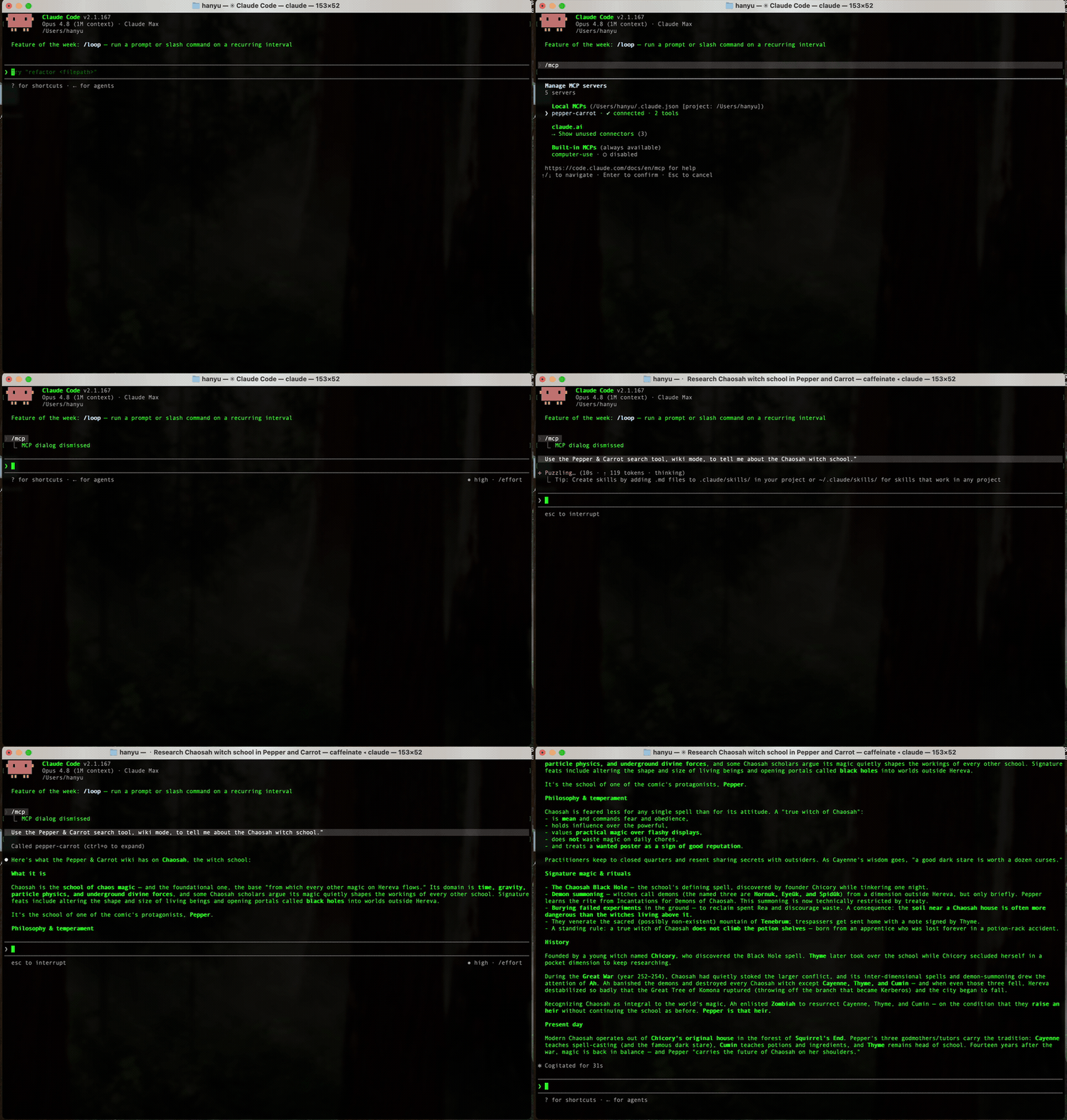
The deployed MCP server in action — here a Claude Code session with pepper-carrot added as an MCP server. /help shows the reading_companion prompt, /mcp lists the two tools, then the search tool answers “what is the Chaosah witch school?” with a grounded reply pulled from the companion’s corpus (recording condensed ~2×). Click to enlarge.
What you’ll build in this post.
- A standalone MCP server (
pepper-carrot-mcp) — a separate repo from the app — that wraps the deployed backend and exposes:
search(query, mode, k, …)— a tool that returns ranked retrieval chunks with similarity scores, metadata, and text. The instrument for retrieval questions.ask(question, mode, …)— a tool that runs the real user-facing answer pipeline and returns the answer the app would give a reader, plus what it retrieved.- three resources (the episode catalog, one episode’s detail, the spoiler-aware world graph) and one prompt (
reading_companion) that teaches a client the spoiler-safe contract.- One small new endpoint on the app —
POST /api/retrieve— because retrieval results were never exposed anywhere. It’s the only backend change, and it adds no new retrieval logic.- A “thin adapter” design with zero domain logic in the server: it forwards JSON and accumulates one streaming response. The spoiler boundary, the prompts, the model calls all stay in the app.
- A deliberate stateless deploy: a Streamable-HTTP MCP server meant to run on more than one machine has to be stateless, or sessions break across replicas. We cover why that is and the one-flag setting that gets it right.
Prerequisites.
- You’ve read — or at least skimmed — the spoiler-safe RAG and streaming chat posts. This post treats that app as a backend service and barely opens its internals.
- The app deployed and reachable (the managed-API deploy is the live target here). You don’t need to redeploy it from scratch — you need its URL.
- Python 3.11+ and
uv. A free Fly.io account (brew install flyctl) if you want your own deploy.- No MCP experience assumed. The next two sections build the concept from zero.
About the repos. This post spans two repositories on purpose. The companion app stays where it’s always been:
pepper-carrot-companion-workshop, where the one new endpoint lands (taggedpost-17-mcp-retrieve, with the decision recorded in ADR 0006). The MCP server is its own repo:pepper-carrot-mcp. Keeping them separate is part of the lesson — the server is a client of the app, not a part of it.
Table of Contents
- Why Give Claude a Tool at All?
- MCP in Plain English
- Server and Client: Two Halves of the Same Protocol
- The Design Decision: “1 + 1”
- The One Backend Change:
POST /api/retrieve - Building the Server with FastMCP
- The Hardest 30 Lines: Replaying the Chat Stream
- Transport, Deploy, and Why It’s Stateless by Design
- Add It to Claude and Test It
- What’s Honest, What’s Open
- Key Takeaways
- What’s Next: The Evaluator
- Appendix: Two Ways to Register a Tool
Why Give Claude a Tool at All?
A language model, on its own, can only produce text. It can’t look anything up, can’t run code, can’t reach into a database. Everything it “knows” is frozen in its weights. That’s fine for “write me a poem,” but useless for “what’s actually on page 3 of this specific episode of this specific webcomic,” because that answer lives in a Postgres row and a vector index the model has never seen.
The whole series solved that for a human user: the RAG pipeline retrieves the right chunks and feeds them to the model so the answer is grounded in the comic rather than hallucinated. But that pipeline is locked inside a web app with a flipbook UI. The only way to use it is to open a browser.
MCP unlocks it for a machine user. MCP is an open protocol, not a Claude feature, so after this post any MCP-capable AI agent can call the companion’s retrieval and answer pipeline directly. Claude is just the client we’ll demo with; the same server works for any agent, IDE, or script that speaks MCP:
- “Search the Pepper & Carrot lore for what Chaosah is” → Claude calls the
searchtool → gets back the actual ranked chunks the app’s retriever would surface, with scores. - “Ask the companion who’s on ep02 page 3, no spoilers” → Claude calls the
asktool → gets back the exact grounded, spoiler-safe answer a reader would see.
There’s a second reason, and it’s the one that makes this more than a party trick: if Claude can call these tools, so can an automated evaluator. The next post builds exactly that — a program that hammers search and ask with a test set and scores how good the retrieval and the answers really are. To grade a system you need a clean handle on it, and an MCP server is that handle. This post builds the handle; the next post grabs it.
MCP in Plain English
If you’ve never met MCP, here’s the whole idea in one analogy and three nouns.
Plain-English aside: MCP is a standard wall socket for AI tools. Before USB, every device had its own connector, and nothing worked with anything else. USB was boring and it won, because “one plug, any device” beats “a brilliant custom plug per device.” MCP is that, for connecting AI models to external capabilities. Before MCP, if you wanted Claude to use your tool, and ChatGPT to use your tool, and your own script to use your tool, you wrote three different integrations. MCP says: expose your capabilities once, behind a standard protocol, and any MCP-speaking client can plug in. Your tool becomes a wall socket; every AI app is an appliance that knows how to plug into a wall socket. You build the socket once.
An MCP server is a program that exposes capabilities. It speaks the MCP protocol and offers three kinds of things, and the whole reason MCP feels learnable is that there are only three:
- Tools — actions the model can take. A tool is basically a function the model is allowed to call: it has a name, a described set of arguments, and it returns a result. “Search the corpus.” “Send an email.” “Run this query.” In our server,
searchandaskare tools. When Claude decides it needs to look something up, it calls a tool the way you’d call a function, except it picks the arguments out of natural language. - Resources — read-only data the client can fetch by address. If tools are verbs, resources are nouns. Each resource has a URI, like
episodes://catalogorepisode://ep02-rainbow-potions, and fetching it returns content. Think of them as files (or GET endpoints) the client can read for context. Ours expose the comic’s episode list, a single episode’s detail, and the spoiler-aware world graph. - Prompts — reusable, parameterized message templates a user can invoke. A prompt is a canned starting message with blanks to fill in. Ours,
reading_companion(episode_slug, page), produces a primed instruction that spells out the spoiler-safe rules of engagement, so a person doesn’t have to remember them.
That’s the entire surface area: tools, resources, prompts. Everything in this post is one of those three, plus the plumbing to serve them.
Server and Client: Two Halves of the Same Protocol
MCP has two roles, and it’s worth being crisp about which is which, because this mini-arc builds both.
- The server offers capabilities (tools/resources/prompts). That’s this post:
pepper-carrot-mcp. - The client consumes them. It connects to a server, discovers what’s on offer, and calls it. Claude (as a desktop app, on claude.ai, or via the API’s connector feature) is an MCP client. So is any script you write with an MCP client library.
The same protocol runs between them, so a server you write works with every client, and a client you write works with every server. That symmetry is the point: it’s why the next post’s evaluator can be “just another MCP client” pointed at this exact server, with no special-casing.
This post is the server half. The companion app it wraps is, from the server’s point of view, just a backend service it makes HTTP calls to. The server adds no intelligence; it translates between the MCP protocol on one side and the app’s existing HTTP API on the other. That leads straight to the central design question.
The Design Decision: “1 + 1”
The server exposes two tools, and the interesting thing is that the two needed different amounts of new work on the app. Figuring out which needed what is the actual design.
ask needed zero new app code. The app already has a full answer pipeline, and it’s already reachable over HTTP — it’s what the chat panel uses. The flow is: open a reading session, set which page you’re on (that’s the spoiler boundary), then post your message and read the answer back as a stream of tokens. The MCP ask tool just replays that exact sequence from the server side and collects the streamed answer into one string. No new endpoint. And replaying the real flow is the whole virtue: the answer the tool returns is byte-for-byte the answer a real reader gets, because it goes through the identical code path. There’s no shortcut that’s merely “close enough” — there’s the real thing.
search needed exactly one new endpoint. Here’s the gap: the app does retrieval on every question, but it never exposes the results. Internally the retriever produces ranked chunks with similarity scores and metadata, but the chat pipeline keeps only the bare chunk IDs and throws the rest away — the scores, the text, the ranking all vanish before anything leaves the server. An evaluator that wants to measure retrieval quality needs exactly that discarded detail. So search is backed by one small new read-only endpoint, POST /api/retrieve, that surfaces what was always computed but never shown.
So the shape is “1 + 1”: one new endpoint, one pure reuse. Naming that split is the design work, and the bias is toward reuse. The diagram:
The MCP server translates between the MCP protocol (left) and the app’s HTTP API (right), and holds no logic of its own. ask reuses the existing chat flow; only search needed a new endpoint. Click the diagram to open it full-size in a new tab.
The One Backend Change: POST /api/retrieve
The whole app-side footprint of this post is a single read-only endpoint. It runs the exact retrieval the chat pipeline already runs — same embedding model, same spoiler filter — and returns the full result instead of discarding it:
1
2
3
4
5
6
POST /api/retrieve
  { "mode": "page" | "wiki", "query": "...", "k": 5,
    "current_episode": 2, "current_page": 3 }     ← position required for page mode
→ { "mode": "page", "boundary": {...},
    "chunks": [ { "rank", "chroma_id", "source_table", "source_id",
                  "score", "metadata", "text" } ] }
Two design notes that matter, both recorded in ADR 0006:
It adds no new retrieval logic. The endpoint calls the same RetrievalService.retrieve the chat orchestrator calls, then a shared fetch_chunk_text helper that loads the canonical text from Postgres. To keep that text lookup from being copy-pasted, it was lifted out of the orchestrator into one function both callers share. The endpoint is about 40 lines of wiring around existing machinery.
The spoiler position is a request parameter here, not server state. In the live chat app, how far you’ve read is stored server-side in your session row, so a jailbreak prompt can’t widen it. The /api/retrieve endpoint instead takes current_episode and current_page as inputs. That’s deliberate, and it’s a feature for evaluation: it lets a test harness sweep the reader’s position and prove the boundary holds at each one. The retrieval logic is byte-identical to production; the only difference is where the two boundary integers come from. For a retrieval-inspection tool over a public CC-BY comic, caller-supplied position is exactly right; for the user-facing chat, server-owned position is exactly right. Same filter, different trust source.
That’s it for the app. Everything else in this post lives in the separate pepper-carrot-mcp repo.
Building the Server with FastMCP
You can write an MCP server against the raw protocol, but you’d hand-roll a lot of JSON-RPC. FastMCP is to MCP what FastAPI is to HTTP: you write plain Python functions with type hints and docstrings, decorate them, and the framework turns each into a properly described tool, resource, or prompt — generating the argument schema from your annotations and the description from your docstring.
The server’s job is to be a thin adapter, so the code splits cleanly into “talk to the app” and “expose to MCP”:
backend.py— the only module that makes HTTP calls to the app. Framework-independent (no MCP imports), so its tricky parts are unit-testable in isolation.tools.py,resources.py,prompts.py— the capability implementations.server.py— a short registration manifest that attaches everything to a FastMCP instance.
Here’s search, the retrieval tool — a near-verbatim proxy, plus the one bit of policy that belongs at the boundary (page mode requires a position; k is clamped):
1
2
3
4
5
6
7
8
9
10
11
12
13
14
15
16
17
18
19
20
# src/pepper_carrot_mcp/tools.py  (abbreviated)
async def search(
    query: str,
    mode: Literal["page", "wiki"] = "wiki",
    k: int = 5,
    current_episode: int | None = None,   # required for page mode
    current_page: int | None = None,      # required for page mode
) -> dict:
    """Search the Pepper & Carrot corpus and return ranked chunks with scores.

    Page mode is spoiler-filtered at the reader's position; wiki mode is
    universe lore with no filter. ...
    """
    if mode == "page" and (current_episode is None or current_page is None):
        raise ValueError("page mode requires current_episode and current_page")
    k = max(1, min(k, get_config().k_max))
    return await get_backend().retrieve(
        mode=mode, query=query, k=k,
        current_episode=current_episode, current_page=current_page,
    )
That docstring isn’t decoration. FastMCP ships it to the client as the tool’s description, which is literally what Claude reads to decide when and how to call the tool. Writing it well is part of the engineering, not an afterthought.
Registration is a manifest — the functions live in their own modules; server.py just attaches them:
1
2
3
4
5
6
7
8
9
10
11
12
13
14
# src/pepper_carrot_mcp/server.py  (abbreviated)
mcp = FastMCP("pepper-carrot")

mcp.tool()(tools.search)
mcp.tool()(tools.ask)

mcp.resource("episodes://catalog")(resources.episodes_catalog)
mcp.resource("episode://{slug}")(resources.episode_detail)
mcp.resource("worldgraph://{slug}/{page}")(resources.world_graph)

mcp.prompt()(prompts.reading_companion)

# Served at /mcp over Streamable HTTP. `stateless_http=True` is load-bearing — see §8.
app = mcp.http_app(stateless_http=True)
Resources are even thinner — each is a one-line proxy of an existing read endpoint, returned as JSON:
1
2
3
4
5
6
7
8
9
10
11
12
# src/pepper_carrot_mcp/resources.py
async def episodes_catalog() -> str:
    """The episode catalog: slug, number, page_count, and summary for each."""
    return _json({"episodes": await get_backend().episodes()})

async def episode_detail(slug: str) -> str:
    """Full detail for one episode: page metadata + character roster."""
    return _json(await get_backend().episode(slug))

async def world_graph(slug: str, page: int) -> str:
    """Spoiler-aware world graph (entities + relationships) at a reading position."""
    return _json(await get_backend().world_graph(slug, int(page)))
The episode://{slug} and worldgraph://{slug}/{page} forms are resource templates: the {slug} placeholder means a client can fetch any episode by name, like a parameterized URL.
The one prompt is the same idea applied to the spoiler contract — a parameterized message that hands a client the rules of engagement so a person doesn’t have to remember them:
1
2
3
4
5
6
7
8
9
10
11
12
13
14
# src/pepper_carrot_mcp/prompts.py
def reading_companion(episode_slug: str, page: int) -> str:
    """Prime a spoiler-safe Pepper & Carrot reading session at a given page."""
    return (
        f"I'm reading Pepper & Carrot episode '{episode_slug}', currently on page {page}.\n\n"
        "When you answer my questions, use the available tools:\n"
        f"- For questions about the story or what's happening, use page mode and set "
        f"current_episode/current_page to my position so nothing past page {page} is spoiled.\n"
        "- For questions about the universe (characters, witch schools, places, lore), use "
        "wiki mode.\n"
        "- Use `search` to inspect the grounding chunks, and `ask` to get a full answer.\n\n"
        "Keep your tone warm and a little whimsical — Pepper & Carrot is a playful world — and "
        "never reveal anything from pages I haven't reached yet."
    )
Notice the prompt only recommends the spoiler-safe arguments; it can’t enforce them. The actual boundary lives in the app, keyed off server-side session state — the prompt is a convenience for the human, not the security control.
The Hardest 30 Lines: Replaying the Chat Stream
The one genuinely fiddly part of the whole server is ask, because the app’s answer endpoint doesn’t return JSON — it streams. The chat route emits Server-Sent Events: a sequence of token events as the model generates, then a final done event carrying the retrieved IDs and the follow-up suggestions. An MCP tool has to return one result, so the server has to consume that whole stream and reassemble it.
Plain-English aside: what “Server-Sent Events” are, and why streaming makes this harder. When you watch a chat answer appear word-by-word, the server isn’t sending one big response at the end — it’s holding the HTTP connection open and pushing small chunks as they’re generated. Each chunk is one “event,” tagged with a type (
token,done,error) and a blob of data, separated by blank lines. Great for a UI that wants to show progress. Mildly annoying for a tool that just wants the final string — you have to read the events as they arrive, append everytoken’s text, watch for thedoneevent to grab the metadata, and bail if anerrorevent shows up. That’s the loop below.
1
2
3
4
5
6
7
8
9
10
11
12
13
14
15
16
17
18
# src/pepper_carrot_mcp/backend.py  (the core of stream_answer, abbreviated)
async with self._client.stream("POST", url, json=payload,
                               headers={"accept": "text/event-stream"}) as resp:
    resp.raise_for_status()
    event, data_lines = None, []
    async for raw in resp.aiter_lines():
        line = raw.rstrip("\r")
        if line == "":                       # blank line ends one event
            _dispatch(event, "\n".join(data_lines), answer, done)
            event, data_lines = None, []
        elif line.startswith(":"):           # comment / heartbeat ping — skip
            continue
        elif line.startswith("event:"):
            event = line[6:].strip()
        elif line.startswith("data:"):
            data_lines.append(line[5:].lstrip(" "))

# _dispatch: append token text, capture the `done` payload, raise on `error`.
The full ask then orchestrates the three calls — create a session, PATCH the page (the spoiler boundary), stream the answer — and returns {answer, retrieved_doc_ids, suggestions, …}:
1
2
3
4
5
6
7
8
9
10
11
# src/pepper_carrot_mcp/backend.py  (abbreviated)
async def ask(self, *, question, mode, episode_slug, current_page, session_id=None):
    if session_id is None:                            # fresh session per call by default
        session_id = await self.create_session(episode_slug)
    await self.set_page(session_id, current_page)     # PATCH — sets the spoiler boundary
    result = await self.stream_answer(
        session_id=session_id, mode=mode, message=question,
    )
    result.update({"mode": mode, "episode_slug": episode_slug,
                   "current_page": current_page, "session_id": session_id})
    return result
One detail worth flagging there: ask creates a fresh session per call by default. The chat pipeline replays recent turns into the prompt as conversation history, so reusing a session would let one question’s context bleed into the next: fine for a chat UI, poison for a reproducible evaluation. A fresh session per call keeps each answer independent.
Because backend.py has no MCP imports, this stream-accumulation is testable against a fake HTTP transport — feed it a canned SSE byte stream and assert on the reassembled answer:
1
2
3
4
5
6
7
8
9
10
11
12
13
14
# tests/test_backend.py  (abbreviated)
async def test_stream_answer_accumulates_tokens_and_done():
    def handler(request):
        return httpx.Response(200, headers={"content-type": "text/event-stream"},
            content=_sse(
                ("token", {"text": "Hello "}),
                ("token", {"text": "world"}),
                ("done", {"retrieved_doc_ids": ["p1"],
                          "suggestions": [{"mode": "page", "text": "What next"}]}),
            ))
    backend = _client(handler)              # an httpx MockTransport — no network at all
    out = await backend.stream_answer(session_id="sess", mode="page", message="hi")
    assert out["answer"] == "Hello world"
    assert out["retrieved_doc_ids"] == ["p1"]
That test, plus a fake-transport test of the whole session flow, is the bulk of the server’s test suite, and it runs with no network and no MCP server.
Transport, Deploy, and Why It’s Stateless by Design
MCP can run over a few transports — the channel between client and server:
- stdio — the server is a subprocess and they talk over standard input/output. Great for a local tool on your own machine (it’s how Claude Desktop runs local servers). Useless for a remote, shared server.
- Streamable HTTP — the server is a normal web service at a URL, and clients connect over HTTPS. This is what you want for a deployed connector that lives on the internet and that claude.ai can reach. (An older SSE transport exists and is being phased out in favor of Streamable HTTP.)
We want a public connector, so it’s Streamable HTTP, served at /mcp. And because the comic is public CC-BY data, the server is authless: there’s nothing private to protect, and the real spending guard is the app’s own per-IP rate limit sitting behind it. Deploy is a small Dockerfile plus a fly.toml, and fly deploy puts it on the internet.
There’s one design decision worth making before you deploy, because the default behaves differently on one machine than on several. When you fly launch, Fly creates two machines by default for availability and load-balances requests across them, and that interacts badly with how a Streamable-HTTP MCP server tracks sessions out of the box.
Plain-English aside: stateful vs. stateless sessions, and why machine count matters. By default, a Streamable-HTTP MCP server is stateful: the first request (an
initializehandshake) sets up a session that lives in that one process’s memory, and every later request is expected to land back on the same process to find its session. That’s fine with one machine. With two machines behind a load balancer, the handshake lands on machine A, the next call gets routed to machine B — which has never heard of this session — and the client gets aSession terminatederror. The answer isn’t to pin a client to a machine (fragile); it’s to make the server stateless, so every request carries everything it needs and any machine can answer it. No shared memory, no affinity required.
So the server is deployed stateless by design, via one flag — mcp.http_app(stateless_http=True), the line you already saw in server.py. With it, the two machines aren’t just harmless but desirable: the server scales horizontally and survives a machine restart mid-conversation. For a tools-only server consumed by a connector and an eval client, stateless is squarely the right mode. And the principle generalizes well past MCP: anything you intend to run on more than one replica has to be stateless, or carry its session state somewhere shared. In-process memory is a single-machine assumption hiding in plain sight.
Add It to Claude and Test It
Once it’s deployed (or running locally), there are two good ways to confirm it works.
Test it like a program — the most direct check is to be an MCP client yourself. A dozen lines with FastMCP’s client lists the tools and calls one against the live server:
1
2
3
4
5
6
7
8
9
10
import asyncio
from fastmcp import Client

async def main():
    async with Client("https://pepper-carrot-mcp.fly.dev/mcp") as c:
        print("tools:", [t.name for t in await c.list_tools()])
        r = await c.call_tool("search", {"query": "What is Chaosah?", "mode": "wiki", "k": 2})
        print("chunks:", len((r.structured_content or {}).get("chunks", [])))

asyncio.run(main())
Test it like a user — add it to Claude as a custom connector. On claude.ai: Settings → Connectors → Add custom connector, name it Pepper & Carrot, paste https://pepper-carrot-mcp.fly.dev/mcp, leave auth empty (it’s authless), and Add. Enable it in a chat from the tools menu, and you’ll see search, ask, and the reading_companion prompt. (Prefer the CLI? claude mcp add --transport http pepper-carrot https://pepper-carrot-mcp.fly.dev/mcp.) Then just talk:
- “Use the Pepper & Carrot
searchtool, wiki mode, to tell me about the Chaosah witch school.” - “Use the
asktool for ep02-rainbow-potions, page 3 — who’s on this page and what are they doing? Don’t spoil anything later.”
Claude reads the tool descriptions, picks the arguments out of your sentence, calls the live server, and grounds its reply in what comes back. That’s the hero demo: your deployed RAG app is now a capability Claude can reach for on its own.
What’s Honest, What’s Open
In the spirit of the series, the things worth saying plainly:
ask makes real, paid calls and writes real session rows. Every ask opens a session, sets a page, and runs a genuine model generation — it’s the production pipeline, with production cost and a couple of database rows per call. That’s the point (it’s the real answer), but it means the eval layer in the next post has to throttle and budget. search, by contrast, is one cheap embedding call.
Authless is correct here and would be wrong elsewhere. The comic is public, so an open connector exposes nothing sensitive, and the app’s rate limit caps abuse. The instant this wrapped private user data, authless would be indefensible — MCP supports auth, and that would become a required (and separate) post.
The server is deliberately dumb, and that’s a feature. It holds no spoiler logic, no prompts, no model knowledge; it forwards JSON and reassembles one stream. If that feels too thin to be impressive, that’s the right instinct inverted: the value is that the app stays the single source of truth, and the MCP layer can’t drift from it. A thick adapter is a second implementation waiting to disagree with the first.
Key Takeaways
1. MCP is three nouns — tools, resources, prompts — behind a standard plug. A tool is an action the model can call; a resource is read-only data it can fetch by URI; a prompt is a reusable templated message. Learn those three and the protocol stops being mysterious. Build the plug once, and every MCP client can use it.
2. Decide what to reuse and what to add, and bias hard toward reuse. ask needed no new app code because the answer pipeline already existed as endpoints; replaying them gives the real answer with zero drift. search needed one new endpoint only because the retrieval detail was computed but never exposed. “1 + 1” wasn’t a constraint imposed on us; it’s the smallest honest footprint, and finding it is the design.
3. A tool’s docstring is its API. The model decides whether and how to call a tool by reading the description you ship. Vague docstring, misused tool. Treat tool descriptions like the public contract they are.
4. Streaming is the fiddly seam, so isolate it and test it offline. Reassembling a token stream into one result is the only hard code in the server. Keeping the HTTP/SSE layer free of MCP imports made it testable against a fake transport, with no network and no server — exactly where you want your one piece of tricky logic to live.
5. In-process session state is a single-machine assumption in disguise. A stateful Streamable-HTTP server fails the moment a load balancer puts a second machine in front of it, so this one ships stateless from the start (stateless_http=True). The principle is general: if it runs on more than one replica, it can’t keep session state in local memory.
6. Keep the adapter thin so it can’t lie. No domain logic in the server means the app stays the single source of truth, and the MCP surface can’t diverge from the product users actually get. Thin isn’t lazy; thin is honest.
What’s Next: The Evaluator
This post built one half of the MCP story: the server, the handle. The next post grabs it from the other side, with an MCP client that’s an automated evaluator. With search and ask exposed as clean instruments, it can ask hard questions the demo can’t:
- How good is the retrieval, really? Drive
searchagainst a gold set of question → expected-chunk mappings and compute recall, ranking quality, and — critically — prove the spoiler boundary never leaks, end-to-end through the tool. - How good are the answers, really? Drive
askagainst golden Q&A and score correctness, faithfulness (is every claim grounded?), and relevance, with an LLM acting as a rubric-guided judge. - When an answer is bad, whose fault is it? Because both tools run on the same question, you can tell retrieval failure (the right chunk never surfaced) apart from generation failure (the model had the chunk and blew it anyway) — the single most useful thing an eval can tell you.
That’s the payoff of building the server first: to measure a system rigorously, you need a clean, programmatic grip on it, and an MCP server is exactly that grip. We built the grip. Next, we squeeze.
Appendix: Two Ways to Register a Tool
If you read other MCP tutorials, you’ll often see tools registered with a @mcp.tool() decorator sitting directly above the function — whereas this server registers them with a function call in server.py (mcp.tool()(tools.search)). They look different enough that it’s worth thirty seconds to see they’re the same thing.
Plain-English aside: a decorator is just a function call. In Python, writing
@mcp.tool()on the line abovedef search(...)is pure shorthand forsearch = mcp.tool()(search)— a decorator is simply a function that takes your function and registers it. So@mcp.tool()(decorator form) andmcp.tool()(search)(call form) do the identical thing: same registration, same argument schema generated from your type hints, same description read from your docstring, zero runtime difference. The only real question is where the registration lives. The decorator co-locates it with the function — shortest and most common, and great for a single-file server. The call form lets each function stay a plain, framework-free thing intools.py(nomcpimport, directly callable in a test) whileserver.pygathers every registration into one glance-able manifest — which is exactly why this project, built around keeping the logic decoupled from the protocol layer, uses it. Same@-desugaring underneath; a choice about file organization, not behavior.
The two forms, side by side:
1
2
3
4
5
6
7
# Decorator form — registration sits on the function (one file, next to `mcp`).
@mcp.tool()
async def search(query: str, ...) -> dict: ...

# Call form — the function stays plain in tools.py; server.py registers it.
async def search(query: str, ...) -> dict: ...   # tools.py  (no MCP import)
mcp.tool()(tools.search)                          # server.py (the manifest)
Both accept the same options, too — @mcp.tool(name="search") and mcp.tool(name="search")(search) are, once more, the very same call. (You may also see an imperative mcp.add_tool(fn) in some versions; same result again.) Pick the decorator for small, single-file servers; pick the call form when you want the implementations decoupled and independently testable. Neither is more “correct” — they desugar to the same registration.
The MCP server is its own repo: pepper-carrot-mcp — clone it, uv sync, point PCC_API_BASE_URL at the live app, and fly deploy your own. The one app-side change — POST /api/retrieve — lives in the workshop starter at the post-17-mcp-retrieve tag, with the rationale in ADR 0006. Or skip the clone entirely and add https://pepper-carrot-mcp.fly.dev/mcp to Claude as a custom connector — the companion’s retrieval and answer pipeline, now a tool Claude can call. Pepper & Carrot is © David Revoy, CC BY 4.0.