Pepper & Carrot AI-powered flipbook · Part 6 — Building an Embeddings Ingestion Pipeline: From Page JSONs to Postgres + Chroma
Post 6 of the Pepper & Carrot AI flipbook series. Post 5 built the ingest-from-images skill that writes one JSON description per page; this post is the Stage-2 Python pipeline that consumes those JSONs — image variants via Pillow, uploads through the storage abstraction, pages and page_characters rows, a per-episode plot summary, and embedded chunks in ChromaDB's pages_v1 collection. By the end, one full episode is ingested end-to-end, with the two-stage design, the recovery story, and the reproduction recipe all walked through.
Post 6 of the Pepper & Carrot AI-powered flipbook series. Post 5 built the ingest-from-images Claude Code skill, the vision provider that reads each comic page and writes a strict PageDescription JSON next to the image. That’s Stage 1. Those JSONs are now sitting on disk, durable and hand-editable. This post is Stage 2: the Python pipeline that consumes them and produces everything else — image variants, database rows, character links, a plot summary, and the embedded chunks that the chat layer will retrieve from later in the series.
What you’ll build in this post.
- One full episode of Pepper & Carrot ingested end-to-end: image variants written to
LocalStorage, descriptions inpages, character links inpage_characters, embedded chunks in ChromaDB’spages_v1collection, and a 2–3 sentence episode plot summary onepisodes.plot_summary.- A walk through
ingestion/ingest.py— the per-page loop, theJsonFileVisionClientthat reads the sibling JSON, per-page commits, and the post-loop plot-summary + embedding steps.- The two-stage design in one picture, why the stages are independent, and what makes the whole thing recoverable when a run fails partway.
Prerequisites.
- Everything from Post 5: the
ingest-from-imagesskill has run against episode 1, sodata/raw/ep01-potion-of-flight/pages/holds apage_NNN.jsonnext to everypage_NNN.jpg.- The workshop starter from Posts 2–4, with
docker compose up -d,alembic upgrade head, andseed.pyalready run.- Ollama running locally with
qwen2.5:7bandbge-m3pulled (the Post 2 model step) — used by Stage 2 for the embeddings and the plot-summary call.
About the repo URL. The code in this post — the Stage 2 pipeline at
ingestion/ingest.py, the image helpers iningestion/images.py, and the embedding writer iningestion/chroma_writer.py— lives in the same workshop starter that backed Posts 2–5: https://github.com/bearbearyu1223/pepper-carrot-companion-workshop. Pull the latest to pick upingestion/ingest.py. The full project repository — frontend, chat orchestrator, world-graph overlay, cloud deploy — lands alongside the deploy guide near the end of the series.Checking out the code. The ingestion work spans two posts that share one checkpoint:
git checkout post-05-06-ingestiongives you a complete, working tree for both theingest-from-imagesskill (Post 5) and the Stage-2 pipeline in this post. Each later post then adds its own tag (post-07-08-fullstack,post-09-rag, …) — see the README’s Following along with the blog series.
Table of Contents
- The Python Pipeline (Stage 2)
- Two-Stage Flow in One Picture
- Why This Was the Right Choice For This Project
- The Honest Trade-offs
- Running It on Episode 1
- Key Takeaways
The Python Pipeline (Stage 2)
Once Stage 1’s JSONs are sitting on disk, Stage 2 is just code. ingestion/ingest.py orchestrates everything. The script is ~540 lines, but the per-episode flow is straightforward; most of the length is wiki-ingestion and world-graph paths we’ll cover in later posts.
Here’s the per-episode flow at the right level of detail to follow. We’ll show the load-bearing parts inline and link the rest.
Load + validate, then build clients
1
2
3
4
5
6
7
8
9
10
11
12
13
14
15
async def _run_episode(episode_dir: Path, *, reembed: bool) -> None:
    settings = get_settings()

    # Step 1: validate input — fail fast on malformed metadata before
    # opening any external connections.
    metadata = load_episode_metadata(episode_dir)
    page_files = list_page_files(episode_dir)
    if not page_files:
        raise click.ClickException(f"No page files found in {episode_dir}/pages/")

    # Build clients (the one place we wire up SDKs — CLAUDE.md rule #1).
    vision = get_vision_client(settings)           # → JsonFileVisionClient
    embedding = get_embedding_client(settings)     # → Ollama or sentence-transformers
    storage = get_storage(settings)                # → LocalStorage or R2Storage
    chat = get_chat_client(settings)               # → for the plot-summary call
The four get_*_client calls return Protocol-typed instances — exactly the seams from Post 4. The factory in clients/__init__.py reads .env and picks an implementation. For Stage 2 in the workshop starter, that resolves to JsonFileVisionClient for vision (the only option in VISION_PROVIDER), OllamaEmbeddingClient for embeddings, LocalStorage for image storage, and OllamaChatClient for the plot-summary call.
A look at JsonFileVisionClient
The vision client deserves a closer look. It’s where the three-vision-provider choice from Post 5 lands as actual code, and it shows the payoff of the Post 4 Protocol-and-factory pattern.
The Protocol itself, from backend/app/clients/vision.py:
1
2
3
4
5
6
7
8
9
10
11
class VisionClient(Protocol):
    async def describe_page(
        self,
        image_path: Path,
        previous_page_description: str | None,
        cast_list: list[str],
    ) -> PageDescription: ...

    async def answer_about_page(
        self, image_path: Path, prompt: str
    ) -> str: ...
Two methods. describe_page is the one Stage 2’s per-page loop calls; answer_about_page is reserved for future runtime page-Q&A and is optional for any given implementation.
And the concrete JsonFileVisionClient (same file, abbreviated for readability):
1
2
3
4
5
6
7
8
9
10
11
12
13
14
15
16
17
18
19
20
21
22
23
24
class JsonFileVisionClient:
    """Reads pre-written `PageDescription` JSON files from disk."""

    async def describe_page(
        self,
        image_path: Path,
        previous_page_description: str | None,
        cast_list: list[str],
    ) -> PageDescription:
        del previous_page_description, cast_list  # JSON is the source of truth
        json_path = image_path.with_suffix(".json")
        if not json_path.is_file():
            raise FileNotFoundError(
                f"No description JSON at {json_path}. Run the "
                f"`ingest-from-images` skill against this episode first."
            )
        return PageDescription.model_validate_json(
            json_path.read_text(encoding="utf-8")
        )

    async def answer_about_page(self, image_path: Path, prompt: str) -> str:
        raise NotImplementedError(
            "Ingestion-only — no model behind this client."
        )
Two things matter here. First, the class implements the Protocol structurally, not nominally: JsonFileVisionClient does not inherit from VisionClient. It just has methods of the right shape, which is the Post 4 rule playing out. Any class with async describe_page(...) -> PageDescription and async answer_about_page(...) -> str satisfies the contract, regardless of inheritance. mypy --strict checks the structural shape, not the class hierarchy.
Second, the implementation contains no model calls at all — no httpx, no anthropic SDK, no ollama SDK. The vision work has already happened out of process, in a Claude Code session that ran before this Python script started, and the result lives on disk as a JSON file the client just reads and validates. From the pipeline’s perspective it is calling a vision model. The “vision model” just happens to be a developer plus Claude sitting in another window.
The factory entry in backend/app/clients/__init__.py is correspondingly tiny:
1
2
3
4
5
6
def get_vision_client(settings: Settings) -> VisionClient:
    # Single implementation: each page image must have a sibling .json file
    # containing a serialised PageDescription. The `ingest-from-images`
    # Claude Code skill produces those JSON files.
    del settings  # no settings consumed today; kept for future provider opts
    return JsonFileVisionClient()
No if settings.vision_provider == ... branch the way get_chat_client has, because in this project we only need the one implementation, and CLAUDE.md’s “never import an SDK outside clients/” rule means nothing else in the codebase has any visibility into what the vision client actually does internally. If the constraints ever flipped — say, the chat layer one day needed live page-Q&A and you wanted a real runtime VLM behind it — you’d add an AnthropicVisionClient class in vision.py and a config branch here, and nothing else in the codebase would change. The route handlers, the ingestion script, the chat orchestrator, the retrieval layer: none of them would notice. That’s the whole point of the Post 4 architecture. The abstraction absorbs even very unconventional choices, like “the vision model is actually a Claude Code session,” without leaking through the rest of the system.
The per-page loop
For each page, in order:
1
2
3
4
5
6
7
8
9
10
11
12
13
14
15
16
17
18
19
20
21
22
23
24
25
26
27
28
29
30
31
32
33
34
35
36
37
38
39
40
41
42
43
async def _process_one_page(
    *, session, storage, vision,
    episode_id, episode_slug, page_number, page_file,
    previous_visual_description, cast_list,
):
    # (a) Generate image variants with Pillow.
    processed: ProcessedPageImages = process_page_image(page_file)

    # (b) Upload variants via the storage abstraction.
    base_key = f"episodes/{episode_slug}/pages/{page_number:03d}"
    await storage.put(f"{base_key}-thumbnail.webp", processed.thumbnail_bytes, "image/webp")
    await storage.put(f"{base_key}-original{page_file.suffix}", processed.original_bytes, ...)
    if processed.is_animated:
        display_key = f"{base_key}-original{page_file.suffix}"   # GIFs keep motion
    else:
        display_key = f"{base_key}-display.webp"
        await storage.put(display_key, processed.display_bytes, "image/webp")

    # (c) Read the page description. JsonFileVisionClient looks for a
    #     sibling page_NNN.json next to the image — written by the skill.
    description = await vision.describe_page(
        image_path=page_file,
        previous_page_description=previous_visual_description,
        cast_list=cast_list,
    )

    # (d) Upsert the pages row.
    page = await upsert_page(session, episode_id, page_number,
                              {"display": display_key, "thumbnail": thumbnail_key,
                               "original": original_key}, description)

    # (e) Set image_metadata (width / height / blurhash / dominant_color).
    page.image_metadata = {
        "width": processed.metadata.width,
        "height": processed.metadata.height,
        "blurhash": processed.metadata.blurhash,
        "dominant_color": processed.metadata.dominant_color,
    }

    # (f) Link characters via the page_characters join table.
    await link_page_characters(session, page.id, list(description.characters_present))

    return page, description
Five things in this loop earn their lines:
Image variants are pre-computed. process_page_image (in ingestion/images.py) returns three variants for every page: a 1600-px-on-the-long-edge WebP for display, a 300-px WebP for thumbnails, and the original bytes pass-through. All three get uploaded under the same episodes/<slug>/pages/<NNN> key prefix. The display variant is the one the flipbook UI loads (covered in the next post); the thumbnail is for the episode picker; the original is kept for archival and high-res views.
Animated pages (GIFs) bypass the display-variant resize. Pepper & Carrot episode 4 has at least one animated page. Pillow’s WebP encoder loses the motion if you write the resized version as a static WebP, so the code detects animated source files (processed.is_animated) and serves the original directly as the display URL. Same key shape, different bytes behind it.
vision.describe_page is the Protocol seam. It accepts an image path, an optional previous-page description, and a cast list. JsonFileVisionClient ignores the second and third arguments; they’re part of the contract because other implementations of VisionClient would need them, but the JSON version pulls everything from the sibling JSON file. (Reminder: the previous_page_description argument is for hypothetical future clients that need narrative continuity context. Claude’s reading inside the skill already has continuity because pages are described in order in the same Claude Code session.)
Per-page commits. Look at the call site of _process_one_page in the parent function:
1
2
3
4
5
for page_num, page_file in enumerate(progress, start=1):
    page, description = await _process_one_page(...)
    await session.commit()                   # ← per-page commit
    page_results.append((page, description))
    previous_desc = description.visual_description
The DB transaction is committed after every page. If page 7 fails for any reason (bad JSON, storage hiccup, network blip), pages 1 through 6 stay committed in the database. The next ingestion run resumes from a known good state. The alternative, one giant transaction per episode, means a single bad page rolls back hours of work.
The image metadata is JSONB. From Post 3’s design decisions: pages.image_metadata is a JSONB column holding {width, height, blurhash, dominant_color} as a single blob, not separate columns. The frontend reads them all together when rendering a page; nothing in the app queries “every page wider than 1000 px.” JSONB keeps the column count flat and lets us add palette or alt_text later as one-line model edits.
After all pages: plot summary + embeddings
Two more steps run after the per-page loop finishes:
1
2
3
4
5
6
7
8
# Step 4: episode plot summary — one chat call across all descriptions.
summary = await _summarize_episode(chat, [d for _, d in page_results], metadata)
await upsert_episode_summary(session, episode_id, summary)
await session.commit()

# Step 6: Chroma writes (after DB commit so PKs are durable on disk).
chroma_writer = ChromaWriter(settings.chroma_persist_dir, embedding)
await chroma_writer.upsert_page_chunks(page_results, episode_number=metadata.episode_number)
The plot summary is one chat call (chat.stream(...)) that takes all the page descriptions as input and asks for a 2–3 sentence summary. That’s stored on episodes.plot_summary and is what the episode picker UI shows underneath each episode card. The prompt is deliberately tight:
1
2
3
4
system = (
    "You are a literary editor writing concise, spoiler-aware plot summaries "
    "for a children's webcomic."
)
Spoiler-aware because the model only sees the descriptions of pages in this episode, not future ones, so it can’t accidentally reveal something downstream.
The Chroma writes happen after the DB commit. The reasoning: if Chroma fails after Postgres has committed, you can re-run safely, since re-ingestion is idempotent. If we wrote to Chroma first and Postgres failed, the vector store would have orphan chunks pointing at IDs that don’t exist anywhere.
Plain-English aside: what’s “idempotent” in this context? An idempotent operation is one you can run multiple times and the end state is the same as running it once. Re-ingesting episode 1 ten times produces the same set of rows in
pagesand the same set of chunks inpages_v1. Achieved here via three primary keys:pages.(episode_id, page_number)is unique (so re-runs upsert the same row, not a new one), Chroma chunks are keyed on a stable composite ID, andLocalStorage.put(from Post 4) is a no-op when the bytes match. Idempotency is what makes a partial-failure recovery just “run it again” instead of “manually clean up state first.”
The full embedding format for pages_v1 chunks — visual_description + "\n\nDialogue:\n" + ... — lives in ingestion/chroma_writer.py, so the chat layer can import the same helper and stay in sync. If retrieval-time text and ingestion-time text drift, retrieval quality silently degrades.
Two-Stage Flow in One Picture
Stage 1 (interactive, Claude Code session) writes JSONs. Stage 2 (the Python pipeline, ~30–60 sec) reads them and produces everything else.
Stage 1 reads the image and writes a sibling JSON; Stage 2 reads the image and the JSON and writes to all three persistent stores. The handoff between stages is the JSON file on disk — durable, auditable, hand-editable. Click the diagram to open it full-size in a new tab.
The cleanest property of this design is that the two stages are independent. You can re-run Stage 1 without re-running Stage 2 (you’ve changed the description prompt and want fresh JSONs but haven’t loaded them yet). You can re-run Stage 2 without re-running Stage 1 (you’ve changed the chunking strategy in chroma_writer.py and want to re-embed against the existing JSONs). Either flow is one command.
Why This Was the Right Choice For This Project
Five reasons this approach fits the portfolio / demo shape of Pepper & Carrot specifically. Each one lines up with a constraint that’s load-bearing here and may not be load-bearing for your project, so read these as “here’s how this approach maps to one specific project’s priorities,” not as “here’s why this beats everything else.”
1. Cost matches a portfolio budget. No metered per-call dollars: the work runs inside an existing Claude Code subscription ($20/mo Pro, $100–200/mo Max), which the author already pays for. The marginal cost of one more page, or one more prompt-iteration pass, is zero. Iterating on the description prompt — “actually, lean more whimsical; capture the mood the panel border evokes; don’t say ‘panel’” — costs nothing but the Claude Code session time. Compare that to ~$13 per full corpus re-ingest with a hosted vision API: harmless at production volume, but a friction tax on a project where the whole point is to iterate prompt phrasing freely. For a paid product where the cost per call is amortized over high request volume, this calculus flips. The hosted API’s per-call price becomes a rounding error, and the ability to run ingestion automatically on a schedule matters more than free iteration.
2. Quality matches what you’d get from a paid call to the same model. Claude Code uses the same Claude Opus model that powers Anthropic’s hosted vision API, prompted via the skill to produce flowing prose with the canonical cast list and a strict schema as the contract. The descriptions are essentially as good as you can get for this task today. This isn’t a “free thing that’s almost as good as the paid thing”; it’s literally the same model. The trade-off is how you call it, not what calls back.
3. Reliability matches a single-developer workflow. No GGML assertion failures, no model-server crashes mid-run, no HTTP rate limits to budget for. The one failure mode that does exist — Claude misreads a page, invents a character — is visible in the JSON on disk and can be hand-edited in 10 seconds. For a single developer iterating in interactive bursts, that’s a much friendlier loop than chasing transient errors in a batch pipeline. For an unattended nightly job, you’d want different failure-handling (retry policies, dead-letter queues, alerting) that a hosted-API path naturally fits into.
4. Auditability is the killer feature, period. Every page description sits on disk as a structured JSON file you can read, diff, and edit. If a description has a factual error (Claude said “Pepper is reading a book” when she’s clearly reading a scroll), you fix the JSON, re-run Stage 2 in 30 seconds, and the new text is in the DB and Chroma. With a runtime VLM, fixing one bad description means either re-running the whole vision pass or maintaining a separate “manual overrides” table the runtime layer checks. This benefit isn’t portfolio-specific: any project that values “fix one bad description in 30 seconds” gets it, regardless of the model behind it. Worth knowing this is the part that generalizes.
5. Architecture leaves the door open. JsonFileVisionClient implements the existing VisionClient Protocol exactly the same way an AnthropicVisionClient would. Nothing else in the pipeline — image processing, storage, DB upsert, character linking, Chroma write, plot summary — knows or cares that the “vision model” is actually a Claude Code session writing files. The seam from Post 4 absorbs the unconventional choice cleanly. If the project’s constraints ever flip — a runtime vision provider for live page-Q&A, an automated scheduled pipeline — reintroducing the right vision client is a config change, not a refactor. The right takeaway from this section isn’t “always use Claude Code as your vision provider”; it’s “build the seam that lets you swap providers when your constraints change.”
The Honest Trade-offs
Three real costs of the Claude-Code-as-vision-provider path, all named up front:
Stage 1 requires an interactive Claude Code session. It can’t run unattended on a schedule, or be triggered by a webhook, or be wired into any “no human present” automation. You have to open a Claude Code window, type “ingest episode 5”, and let it work for 10–15 minutes. For a portfolio project where ingestion is a once-per-episode-added concern, this is fine. For a real product that ingests new content on a schedule or under SLAs, this rules the approach out, and you’d reintroduce a hosted vision client and pay the per-call cost.
Doesn’t scale to a full corpus in one session. Each Claude Code session has a finite context window. Reading 100+ images in one conversation fills it up, so the recommended pattern is one Claude Code session per episode for batch work. For Pepper & Carrot’s ~40 episodes, that’s 40 sessions over a few weekends. Workable for a portfolio project; unworkable as a per-publishing-cycle workflow in a CMS.
No live VLM for runtime page-Q&A. JsonFileVisionClient.answer_about_page raises NotImplementedError. The chat orchestrator (covered in a later post) operates on retrieved text, not images, so this isn’t a feature gap today. If a future feature needs live pixel inspection at chat time (“describe panel 3 in detail”), you’d reintroduce a different vision provider for that path. The Protocol is still in place; the abstraction holds.
When you’d choose differently
To make the framing concrete, here’s the decision tree for another project picking a vision provider:
| Your project’s situation | What we’d pick |
|---|---|
| Paid product · ingestion runs unattended on a schedule | Hosted vision API (Anthropic, OpenAI, Google). Same quality as Claude Code; you pay for the unattended automation and per-call SLAs. |
| Privacy posture requires pixels stay on your own infra | Local VLM (Qwen3-VL, Llama 4 Vision, etc., on owned GPUs). Pay the latency and GPU-amortization cost for the privacy. The markdown-leakage problem we hit on qwen2.5vl:7b is much smaller on the current generation of open-weights VLMs. |
| One-off internal tool · you already have a Claude subscription · no scheduled/unattended runs needed | Claude Code as vision provider (this post’s path). Free, high-quality, JSONs on disk. |
| Tiny corpus (<50 images), one-time job | Any of the above — at this size the choice barely matters. Pick whichever you already have credentials for. |
| Very large corpus (millions of images), unit-economics dominate | Probably a self-hosted optimized VLM behind a batch API. Per-call hosted-API pricing adds up; Claude Code path doesn’t scale. |
The portfolio-project version of this project is in row three. Most real products live in rows one or two. Pick the row your project is actually in. The architecture in this codebase — the VisionClient Protocol from Post 4 — supports any of the rows. That’s the durable lesson; the specific row we picked is just a case study.
Running It on Episode 1
Here’s the full reproduction recipe. You should have everything from Posts 2–3 already set up.
1. Confirm prerequisites
If you’ve worked through Posts 2 and 3 recently, most of this is already in place — but each command below is idempotent, so you can run the whole block top-to-bottom whether starting fresh or resuming. Everything assumes you start at the repo root.
1
2
3
4
5
6
7
8
9
10
11
12
13
14
15
16
17
18
19
20
21
22
23
24
25
26
27
28
29
30
# 1a. Repo at the right state
cd path/to/pepper-carrot-companion-workshop
git pull                                          # pick up Post 5-6's ingestion code + the skill

# 1b. .env in place (docker-compose reads it for Postgres credentials,
#     and the wrapper script reads/writes VISION_PROVIDER in it)
[[ -f .env ]] || cp .env.example .env             # no-clobber: keeps any existing .env

# 1c. Postgres up + healthy + schema applied + characters seeded
docker compose up -d
docker compose ps                                 # postgres should show (healthy)
(cd backend && uv sync \
            && uv run alembic upgrade head \
            && uv run python -m app.db.seed)     # 31 canonical characters upserted

# 1d. Ollama serving + both models installed
#     (qwen2.5:7b ≈ 4.7 GB for the plot-summary call; bge-m3 ≈ 1.2 GB for embeddings.
#      qwen2.5vl:7b is NOT needed — Claude Code itself is the vision provider.)
ollama serve &                                    # skip if you already run the menu-bar app
ollama pull qwen2.5:7b                            # no-op if already installed
ollama pull bge-m3                                # no-op if already installed
ollama list                                       # both should appear

# 1e. Episode 1 on disk + ingestion deps installed
(cd ingestion && uv sync \
              && uv run python acquire.py episode \
                   --slug ep01_Potion-of-Flight \
                   --lang en \
                   --out ../data/raw)
ls data/raw/ep01-potion-of-flight/pages/          # page_001.jpg, page_002.jpg, page_003.jpg
If any step fails, fix it before continuing — the skill will assume all five are in place. The acquire.py script is idempotent too: re-running only re-downloads what’s missing.
2. Open Claude Code in the repo
1
2
cd path/to/pepper-carrot-companion-workshop
claude
The ingest-from-images skill auto-loads because its description matches your repo’s local .claude/skills/.
3. Ask Claude to ingest the episode
Type into the Claude Code prompt:
1
ingest episode 1 from images
What happens next (transcribed from a real run):
- Claude resolves the slug. Runs
ls data/raw/ | grep '^ep01-', findsep01-potion-of-flight. - Claude pulls the cast list. Runs
docker exec peppercarrot-postgres psql ...and surfaces the 31 canonical names. - Claude reads each page. For
page_001.jpg,page_002.jpg,page_003.jpg, it uses theReadtool to view each image, then composes aPageDescriptionand writes the JSON next to the image. - Claude validates. Runs the
model_validate_jsonloop. Output should bepage_001.json: OK / page_002.json: OK / page_003.json: OK. - Claude invokes the wrapper script.
.claude/skills/ingest-from-images/scripts/reingest_with_json.sh ep01-potion-of-flight. You’ll see Stage 2’s per-page progress bar tick through three pages, the plot summary call, and the Chroma writes. - Claude runs verification queries. Two
psqlqueries confirming the row landed and characters linked. Expecthas_summary = t,page_count = 3.
If you want to watch it without retyping at each step, hit Tab (autocomplete) or just stay out of the way — the skill is set up to drive the whole flow autonomously.
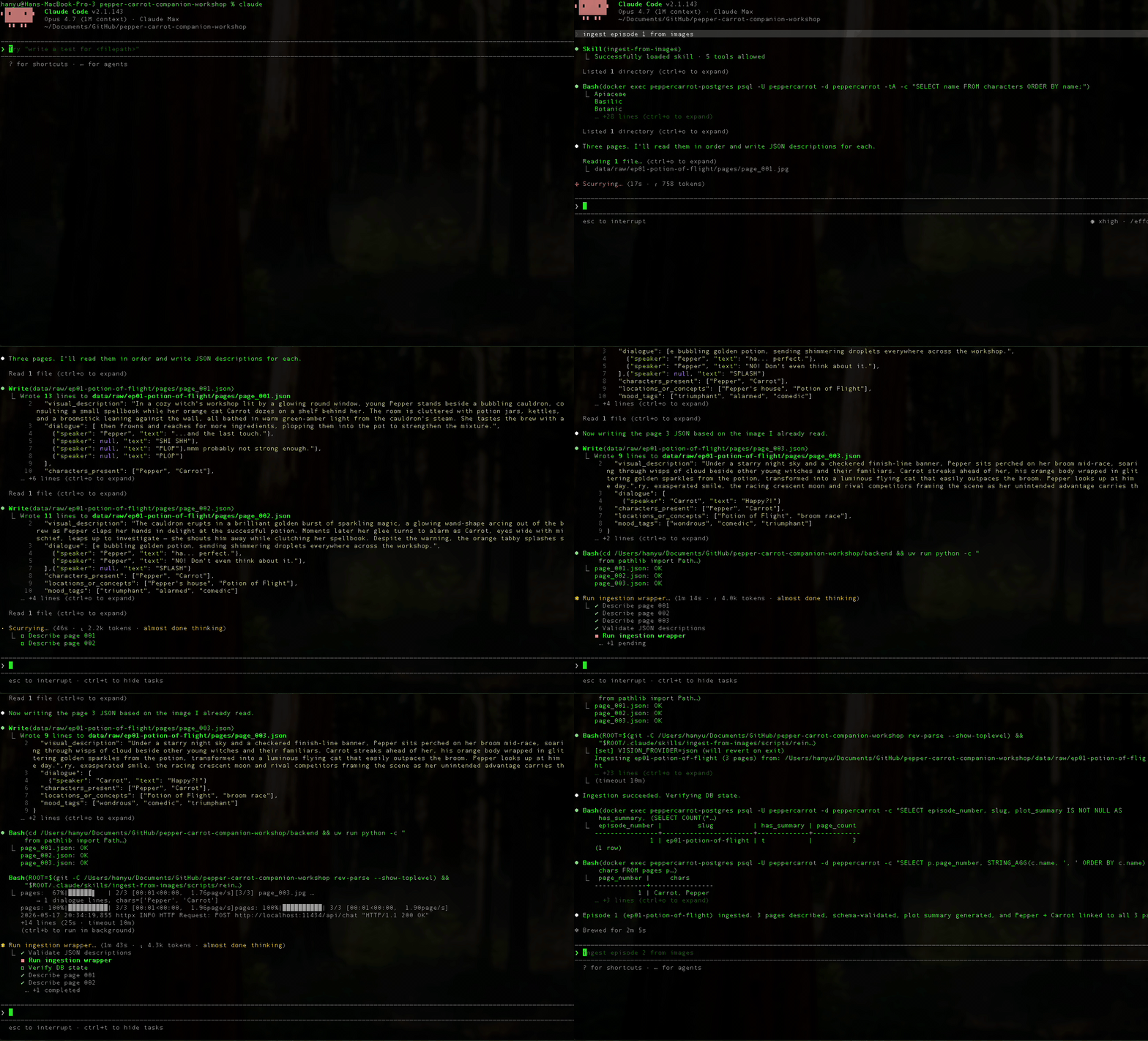 A live walkthrough of
 ingest-from-images on episode 1 — skill loads, Claude reads each page image, writes the JSONs, runs the wrapper script, Stage 2 produces variants + DB rows + Chroma chunks + plot summary in ~30 seconds. (Click to enlarge.)
4. Verify the result yourself
A few one-line queries you can run from a second terminal:
1
2
3
4
5
6
7
8
9
10
11
12
13
14
15
16
17
18
19
20
21
22
23
24
25
26
27
28
29
30
31
32
33
34
35
36
37
# All three pages in the DB, with the first 80 chars of each description.
docker exec peppercarrot-postgres psql -U peppercarrot -d peppercarrot -c "
  SELECT p.page_number, LEFT(p.visual_description, 80) AS preview
  FROM pages p JOIN episodes e ON e.id = p.episode_id
  WHERE e.slug = 'ep01-potion-of-flight'
  ORDER BY p.page_number;
"

# Episode plot summary on the episodes row.
docker exec peppercarrot-postgres psql -U peppercarrot -d peppercarrot -c "
  SELECT plot_summary FROM episodes WHERE slug = 'ep01-potion-of-flight';
"

# Character links per page.
docker exec peppercarrot-postgres psql -U peppercarrot -d peppercarrot -c "
  SELECT p.page_number, STRING_AGG(c.name, ', ' ORDER BY c.name) AS chars
  FROM pages p
  LEFT JOIN page_characters pc ON pc.page_id = p.id
  LEFT JOIN characters c ON c.id = pc.character_id
  WHERE p.episode_id = (SELECT id FROM episodes WHERE slug = 'ep01-potion-of-flight')
  GROUP BY p.page_number ORDER BY p.page_number;
"

# ChromaDB chunks.
cd backend && uv run python -c "
import chromadb
client = chromadb.PersistentClient(path='../data/chroma')
col = client.get_collection('pages_v1')
print(f'pages_v1 has {col.count()} chunks')
print(col.peek(1))
"

# Image variants on disk.
ls data/images/episodes/ep01-potion-of-flight/pages/
# 001-display.webp  001-thumbnail.webp  001-original.jpg
# 002-display.webp  002-thumbnail.webp  002-original.jpg
# 003-display.webp  003-thumbnail.webp  003-original.jpg
If all five queries return the expected shape, you have one episode fully ingested. Every later post in the series builds on top of this state.
The SQL queries confirm the shape of the data landed. The actual quality of the descriptions is something only your eyes can verify, so here’s each page of episode 1 with the JSON the skill wrote next to it, side by side. Click any image to open it full-size in a new tab.
Page 1.
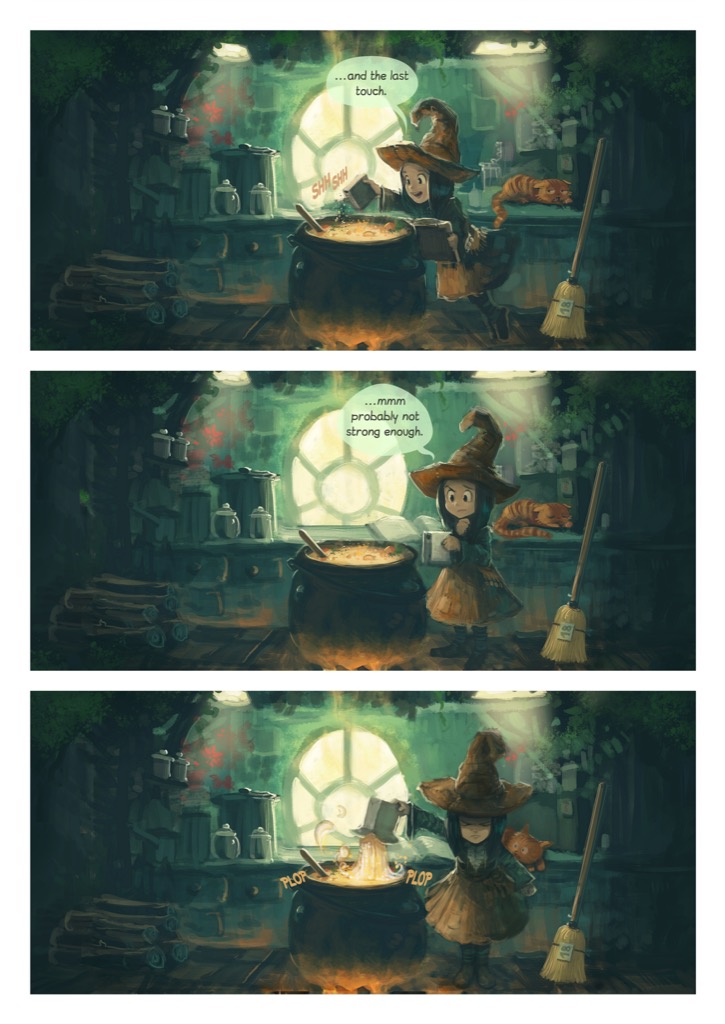 | |
page_001.json. visual_description is prose, no markdown leakage. dialogue is verbatim (SHI SHH, PLOP are sound effects with speaker = null). Both characters are canonical names from the seeded characters table.
Page 2.
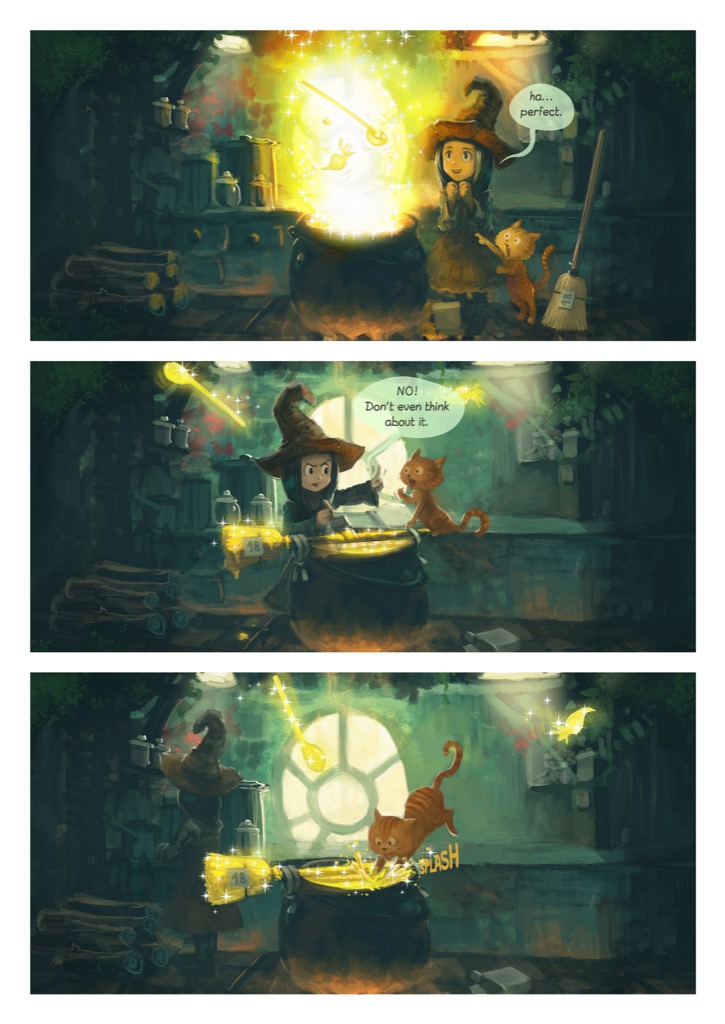 | |
page_002.json. The mood progression triumphant → alarmed → comedic traces the page’s three-beat narrative arc. SPLASH is another sound effect (speaker = null). Potion of Flight now appears in locations_or_concepts — the named potion this episode introduces, a hook for later retrieval.
Page 3.
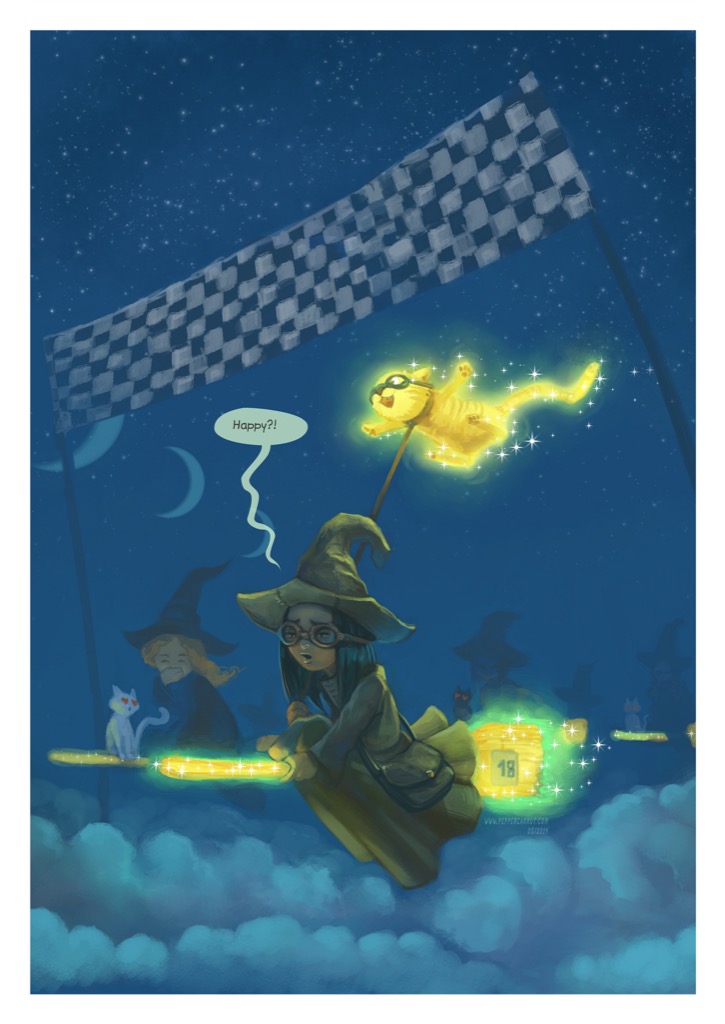 | |
page_003.json. A mostly-action page: only one dialogue line — Carrot’s — captured under his canonical name (the schema doesn’t enforce real-world plausibility). Potion of Flight carries forward as the cross-page narrative anchor.
5. Inspect a JSON (and edit if you want)
The JSONs are sitting next to the images. Open one:
1
cat data/raw/ep01-potion-of-flight/pages/page_001.json | jq .
1
2
3
4
5
6
7
8
9
10
{
  "visual_description": "In a sunlit potion shop in Komona, Pepper concentrates …",
  "dialogue": [
    {"speaker": "Pepper", "text": "Now where did I put that vial of moonsilver?"},
    {"speaker": null, "text": "MEOW"}
  ],
  "characters_present": ["Pepper", "Carrot"],
  "locations_or_concepts": ["Komona"],
  "mood_tags": ["focused", "cozy"]
}
Edit it in your text editor — fix a phrase, add a character, adjust a mood tag — then re-run the wrapper script:
1
./.claude/skills/ingest-from-images/scripts/reingest_with_json.sh ep01-potion-of-flight
Thirty seconds later, the new description is in pages.visual_description, re-embedded in pages_v1, and the new plot summary reflects the change. The JSON-on-disk hand-edit loop is the killer feature of this design. You couldn’t easily do this with a runtime vision model: to retouch one description you’d have to either re-run the whole VLM pass or maintain a separate “manual overrides” table the runtime checks.
Key Takeaways
1. Pick the vision provider for your project’s actual constraints. Local VLM, hosted API, or Claude Code itself — none is universally best. The right choice depends on whether you need unattended automation, what your per-call budget is, whether iteration speed dominates over throughput, and what privacy posture you’re operating under. For this portfolio project, free iteration and zero-ops-cost made Claude Code the right call. For a paid product ingesting comics nightly under SLAs, a hosted API would be. For a privacy-sensitive deployment keeping pixels in-house, a self-hosted open-weights VLM would. Read this post as one case study, not a prescription, and run your own version of the decision tree under “When you’d choose differently” before committing.
2. Skills are pinned, executable prompts. A Claude Code skill is the difference between “explaining the task to Claude every time” and “explaining it once and having Claude remember.” When a task has rigid structural requirements — strict schemas, canonical vocabulary, validation steps, follow-up scripts — wrapping it in a skill makes the work reliable and the friction near zero.
3. Make the high-leverage step auditable. Page descriptions are the highest-leverage input to chat quality in the entire system. Putting them on disk as inspectable JSON, rather than treating them as ephemeral model output, means fixing a bad description is a 30-second hand-edit instead of a multi-hour pipeline re-run or a brittle “manual overrides” layer. Push correctness-critical artifacts onto disk; treat them as source of truth.
4. Two-stage pipelines are recoverable pipelines. Stage 1 is the slow expensive step; Stage 2 is the fast deterministic step. Separating them with a durable artifact (the JSON) means partial failures are cheap. Network blip during Chroma writes? Re-run Stage 2; Stage 1’s work is on disk. Bug in your chunking strategy? Re-run Stage 2 against existing JSONs in 30 seconds, with no need to re-describe anything. Architectures that hand off through durable, inspectable files almost always end up easier to operate than monolithic ones.
5. Protocols absorb unconventional choices. Substituting “a Claude Code session” for “a model client” sounds like it should require a special path through the codebase. It doesn’t. JsonFileVisionClient satisfies the same VisionClient Protocol any model-backed implementation would, and the rest of the pipeline doesn’t know or care. Good abstractions let you make weird choices without paying a weirdness tax across the codebase.
6. Cost shapes iteration; iteration shapes quality. Whichever vision provider you pick, the per-call price you pay during prompt iteration (before a stable prompt ships) has compounding effects on output quality. If every prompt change costs $30+ at Opus pricing, you’ll make fewer changes; if every change is free, you’ll iterate to better outputs. The portfolio-project decision matrix here weighted “free iteration” very heavily, but a real product launching against a fixed deadline might rationally weight “ship a known-acceptable prompt now” over “iterate to a slightly better one.” Both are defensible; just be deliberate about which one you’re optimizing.
Next up: Post 7 — From Database to JSON: A Typed REST API. With one episode sitting in Postgres + ChromaDB + LocalStorage, it’s time to surface it. We’ll wire up the first FastAPI route handlers, the episodes list and the page detail, with Pydantic response models and the relative-key → absolute-URL resolution that turns a stored image key into a URL the browser can load. By the end of that post the backend serves real episode data over HTTP, ready for the flipbook UI to consume.
The workshop starter that backs this post is at https://github.com/bearbearyu1223/pepper-carrot-companion-workshop, tagged post-05-06-ingestion — the same checkpoint the Post 5 skill post uses. The full source repository and a public live-demo URL go up alongside the deploy guide near the end of the series — once it’s published.
Pepper & Carrot is © David Revoy, licensed CC BY 4.0. All credit to him for the source material that made this project possible.
All opinions expressed are my own.