Pepper & Carrot AI-powered flipbook · Part 13 — Visualizing a Knowledge Graph: A React-Flow Overlay and Summary-First Wiki
Post 13 of the Pepper & Carrot AI flipbook series. Post 12 produced a spoiler-safe world-graph API from the extract-world-graph skill; this post renders it. A React + @xyflow/react overlay draws circular avatar nodes with kind-based SVG fallbacks, a kind-filter bar, kind-colored edges that brighten on the selected node, a focus-vs-full mode toggle, and a soft fade-in for entities revealed by the latest page flip. An "Ask in wiki mode" click round-trips back through the chat panel — and a third skill, summarize-wiki, authors one tight ~150-word summary per entity so the small local model answers cleanly instead of drowning in 30 KB of multi-entity articles.
Post 13 of the Pepper & Carrot AI-powered flipbook series. Post 12 did the hard part with no pixels to show for it. A second Claude Code skill, extract-world-graph, walked the wiki sources and the page-description JSONs and wrote a durable YAML pair; a pydantic loader upserted it into Postgres; and a single FastAPI route, GET /api/world-graph, served the graph through a spoiler filter expressed as a Postgres row-value comparison, with two response modes (full and focus) sharing one lexicographic boundary. This post gives that API a face. A React + @xyflow/react overlay renders the spoiler-safe nodes and edges as circular avatar nodes that reveal themselves over time, gated by exactly the same boundary the chat sits behind. And it closes the loop with a third skill, summarize-wiki, so that when the reader clicks “Ask in wiki mode” on a graph node, the small local model (qwen2.5:7b) has the right context to answer with instead of drowning in 30 KB of multi-entity articles.
What you’ll build in this post.
- A React +
@xyflow/reactoverlay panel infrontend/src/components/world-graph/(eight small files): avatar nodes with eight invisible handles so edges route through whichever side reads cleanest, a kind-filter bar with per-kind counts to thin a busy spread, a mode toggle pill (“This page” / “Whole world”), kind-based edge coloring that brightens on the selected node’s incidents, a focus-layout that re-arranges the visible subset into a kind-grid when focus mode is on, an info card with an “Ask in wiki mode” button that round-trips through the chat panel, and a soft fade-in animation for entities revealed by the latest page flip. The viewport auto-fits to the visible nodes in both modes so the whole-world view doesn’t strand entities off the right edge of the panel.- A third Claude Code skill,
.claude/skills/summarize-wiki/SKILL.md, that reads the wiki source.mdfiles + the entity list and writes one tight ~100-300 word summary per entity (plus a handful of topic summaries) todata/wiki-summaries/. The wiki ingestion pipeline embeds these summaries — not the raw 30 KB articles — so top-3 wiki retrieval lands ~500 words of focused context per question, small enough that Post 11’sOUTPUT RULESstill hold against qwen2.5:7b when the reader clicks “Ask in wiki mode” on a graph node.Prerequisites.
- Post 12 finished: the
extract-world-graphskill run (or the shipped YAML in place), the loader applied soworld_entities+world_relationshipsare populated, andGET /api/world-graphreturning spoiler-filtered nodes and edges. This post renders that route — it assumes the API from Post 12 is live.- The workshop starter at the
post-12-13-worldgraphtag:git checkout post-12-13-worldgraph(see Following along with the blog series). Postgres up, migrations applied, the roster seeded, at least Episode 1 ingested, Ollama running withqwen2.5:7bandbge-m3pulled.- Node.js 20+ and the same Vite frontend setup from Post 8.
Checking out the code. The overlay components, the
App.tsxwiring, thesummarize-wikiskill, and the summary-first wiki ingestion changes live in the same workshop starter that backed Posts 2–12, at thepost-12-13-worldgraphtag:git checkout post-12-13-worldgraph. This is the same checkpoint Post 12 — A World Graph Built by a Skill uses: the two posts split one checkpoint between the spoiler-safe API (there) and the React-Flow overlay (here).
Table of Contents
- The Frontend Overlay
- The Soft Fade-In: A Diff That Drives a Keyframe
- Closing the Loop: The Third Skill and Summary-First Wiki
- What’s Honest, What’s Open
- Key Takeaways
The Frontend Overlay
Eight components in frontend/src/components/world-graph/. Total ~900 lines. Walked from the leaves up:
constants.ts— Kind → border-color mapping (a shared CSS-var dictionary), kind → label, thedisplayUrlFor()helper that swaps-thumb.webpfor-display.webpso the info card can fetch the bigger variant without a separate API call, andEDGE_KIND_COLOR— a per-edge-kind palette grouped semantically (structural = accent, kinship = plum, opposition = red) so the graph reads as four or five visual categories instead of nine distinct colors.fallback-icons.tsx— Per-kind SVG silhouettes for entities without scraped art: a witch’s hat forcoven, a tower forplace, a paw print forcreature, a four-point sparkle forobject, and the first letter of the name forcharacter. Sized by asizeprop so the same icon scales from the 72-pixel graph node up to the 200-pixel info-card portrait.AvatarNode.tsx— A custom react-flow node. A circular avatar with a kind-colored border, either the scraped image or the fallback icon. Eight invisible handles (one source plus one target on each of the four sides) letWorldGraphpick the side per-edge so a horizontal pair gets a left→right curve and a vertical pair gets a top→bottom curve. Without that, react-flow’s default routing makes every edge come out the bottom and re-enter the top, which is fine for one or two edges and a snarl for fifteen.InfoCard.tsx— The popover that opens on click. Larger 320-px portrait, name + kind badge, summary, and the “Ask in wiki mode” button that callsonAskInWiki(entity.name). Esc + outside-click dismiss (withstopPropagationon the keydown so an open card doesn’t leak Esc up to the overlay and close the whole panel).KindFilterBar.tsx— A row of toggleable chips above the canvas, one per kind that has any visible nodes, each showing a per-kind dot in the kind’s color and a count badge. Click a chip to hide that kind; the canvas re-renders without those nodes (and without any edge with a hidden endpoint). The bar refuses to turn off the last active kind so the reader can’t accidentally empty the graph and have nothing to recover from.focus-layout.ts— Computes a fresh kind-grid layout for focus mode: covens in a row aty = -ROW_GAP, characters + creatures + objects on the main row aty = 0(with each familiar inserted right after its owner so thefamiliar_ofedge stays a short horizontal line), places aty = +ROW_GAP. The full-world coordinates make a sparse mess when only a handful of nodes are in scope; the kind-grid keeps the focus subset centered and legible. Names sort alphabetically within each row for stability.WorldGraph.tsx— The canvas. Owns the API fetch, the kind filter, the mode toggle, the fade-in diff, the edge-coloring regime (default / focused / dimmed), and the per-edge handle selection. The pivot between focus and full mode is one line,mode === 'focus' ? computeFocusLayout(...) : null, and aFitOnNodesChangechild auto-fits the viewport whenever the focused node set changes so the reader doesn’t have to pan-and-zoom to find a four-node spread.WorldGraphOverlay.tsx— The slide-in side panel that wraps the canvas. Right-anchored on desktop (~560 px wide), full-screen sheet on mobile. Backdrop dims the flipbook without hiding it. A small hand-inked tendril SVG sits before the “World” title so the panel reads as a page from a witch’s journal rather than as a CMS modal.
The component the rest of the system talks to is WorldGraphOverlay. It takes episodeSlug, page, an optional rightPage (for two-page-spread landscape), onAskInWiki, onClose, and renders. App.tsx decides when to mount it (worldOpen state) and how to handle the wiki-mode round-trip:
1
2
3
4
5
6
7
8
9
10
11
12
13
14
15
16
17
18
19
20
21
22
23
24
25
26
// frontend/src/App.tsx (the world-graph wiring, abridged)
const [worldOpen, setWorldOpen] = useState(false);
const [outboundQuestion, setOutboundQuestion] = useState<
  { mode: Mode; text: string } | null
>(null);

// …in the header:
<button type="button" className="header-world" onClick={() => setWorldOpen(true)}>
  🌐 World
</button>

// …after the main content:
{worldOpen && (
  <WorldGraphOverlay
    episodeSlug={selectedEpisode.slug}
    page={currentPage}
    // Landscape spread → pass the right page so focus mode seeds from
    // both visible pages and the spoiler cursor uses the rightmost page.
    rightPage={showSpread ? rightPage : undefined}
    onAskInWiki={(entityName) => {
      setWorldOpen(false);
      setOutboundQuestion({ mode: 'wiki', text: `Tell me about ${entityName}` });
    }}
    onClose={() => setWorldOpen(false)}
  />
)}
ChatPanel watches outboundQuestion as a useEffect dep and submits whenever its object identity changes, so clicking “Ask in wiki mode” on the same entity twice still triggers a fresh turn (a new { mode, text } object each time). The chat panel does the actual SSE call through the same streamMessage from Post 10; the world graph is just one more entry point into the chat pipeline that already exists.
Focus vs full, in one beat
The mode toggle pill in the panel header flips between two views of the same spoiler-filtered universe:
- Focus (default): the canonical characters drawn on the page(s) the reader is currently looking at, plus a 1-hop expansion through three structural edge kinds —
member_of(which coven the witch belongs to),lives_in(where the character lives), andfamiliar_of(which animal companions go with which witch). On ep11 page 4 (where Pepper meets Prince Acren) the focus set is 6 nodes: Pepper + Carrot + Cumin (on-page) + Acren (on-page) + Chaosah + Squirrel’s End (1-hop neighbors). The godmothers Cayenne and Thyme are visible in full mode at that cursor but aren’t expanded into the focus set, because no edge from the seed set walks to them through one of the structural kinds. - Full: every entity whose debut is at or before the reader’s cursor, laid out at the curated YAML positions (Pepper at origin, covens at compass points, places along the bottom strip). On ep11 page 4: 30 nodes, 42 edges — every entity from ep01–ep11.
There are two modes and not one because the question “what’s relevant to this page?” is structurally different from “what does the world I’m reading about look like?” Focus mode is for inhabiting the moment; full mode is for the explorer’s wide view. The reader picks per session per page, and since both views are one cheap SQL query, the toggle is instant.
The two modes also exercise different bits of the data model. Focus mode joins page_characters (the per-page character links from Post 7) and the world-graph’s character_id foreign key, the same bridge that future chat enrichment would use. Full mode is the row-value comparison straight through. The spoiler boundary is identical in both: the rightmost visible page becomes the cursor, the SQL gates entities and edges, and the response only carries what the reader has earned the right to see.
Edge styling: kind-colored on focus, neutral by default
Edges are drawn in a single warm neutral by default, rgb(110, 80, 50) at 55% opacity, so the graph reads as a network rather than a kaleidoscope. When the reader selects a node, every edge incident to it brightens to its kind-specific color (member_of accent-orange, godmother_of plum, rival_of red, …), the rest dim to 18% opacity, and the kind label pops up on a parchment pill so you can see what the relationship is without hovering. The transition is 180 ms: fast enough to feel responsive, slow enough that the eye catches what just changed.
This is one of those small details that disproportionately changes how the graph reads. Without it, every edge looks the same and you have to click each one to find out what it means. With it, picking a node turns the graph into a sentence: “Pepper is a member_of Chaosah, lives_in Squirrel’s End, rival_of Saffron, with familiar Carrot…”. The data is the same; the affordance is what makes it readable.
Why react-flow, and why not write the graph by hand? The graph is small (~20 nodes for the workshop, ~50 for the full app) and a hand-rolled SVG would render fine; pan/zoom/drag are 200 lines of code. The reason for
@xyflow/reactis the part that isn’t rendering: edge routing through configurable handles, focus + selection events, fitView, mini-map (optional), keyboard navigation, and a CSS API stable enough that the workshop’s parchment theming layers on top cleanly. The library is ~150 KB minified (visible in the build output), which is real but reasonable for a feature like this.
The Soft Fade-In: A Diff That Drives a Keyframe
The polish bit. When the reader flips into ep11 for the first time, three new nodes (the godmothers) and three new edges (the godmother_of relations) become visible. The MVP would just have them pop into existence. The polish has them fade in softly so the reader’s eye catches the change.
The implementation is deliberately not a state machine. It’s a diff against the previous snapshot, mounted as a CSS class for exactly one render cycle, with the animation driven by @keyframes:
1
2
3
4
5
6
7
8
9
10
11
12
13
14
15
16
17
18
19
20
21
22
23
24
25
26
27
28
29
30
31
32
33
34
35
36
// frontend/src/components/world-graph/WorldGraph.tsx (abridged)
const previousIdsRef = useRef<{ nodes: Set<string>; edges: Set<string> }>({
  nodes: new Set(),
  edges: new Set(),
});
const [newlyRevealed, setNewlyRevealed] = useState<{
  nodes: Set<string>;
  edges: Set<string>;
}>({ nodes: new Set(), edges: new Set() });

useEffect(() => {
  api.fetchWorldGraph(episodeSlug, page).then((res) => {
    // Diff: anything in the new snapshot that wasn't in the previous
    // snapshot is freshly revealed by a page flip — fade it in.
    const prev = previousIdsRef.current;
    const newNodes = new Set(
      res.nodes.filter((n) => !prev.nodes.has(n.id)).map((n) => n.id),
    );
    const newEdges = new Set(
      res.edges.filter((e) => !prev.edges.has(e.id)).map((e) => e.id),
    );
    previousIdsRef.current = {
      nodes: new Set(res.nodes.map((n) => n.id)),
      edges: new Set(res.edges.map((e) => e.id)),
    };
    // First load (prev.nodes empty): treat everything as already-known
    // so we don't animate every node on first paint. Fade-in is
    // reserved for the debut-on-flip moment.
    setNewlyRevealed(
      prev.nodes.size === 0
        ? { nodes: new Set(), edges: new Set() }
        : { nodes: newNodes, edges: newEdges },
    );
    setData(res);
  });
}, [episodeSlug, page]);
Each node carries the diff result on its className:
1
2
3
4
5
6
7
const nodes = data.nodes.map((entity) => ({
  id: entity.id,
  type: 'avatar',
  position: { x: entity.x, y: entity.y },
  data: { entity },
  className: newlyRevealed.nodes.has(entity.id) ? 'world-node--new' : '',
}));
And the CSS does the rest:
1
2
3
4
5
6
7
8
@keyframes world-node-debut {
  0%   { opacity: 0; transform: scale(0.6); }
  60%  { opacity: 1; transform: scale(1.08); }
  100% { opacity: 1; transform: scale(1); }
}
.world-node--new .world-node {
  animation: world-node-debut 520ms ease-out;
}
Three small wins from this design:
- The first render is silent. When the overlay opens, the diff sees an empty previous-snapshot and falls back to “treat everything as already-known,” so no animation. Fade-in is reserved for the debut-on-flip moment, where it actually carries meaning.
- No animation library. Pure CSS keyframes. The diff is
O(n)over a set of ~20 entities; the animation is GPU-cheap. - The class is sticky for exactly one render. Because
setNewlyRevealedis called once per fetch and the JSX recomputes the class on every render, the next state change (a node click, a selection) clears the--newclass without re-triggering the animation. The animation plays once per debut.
The same shape applies to edges with a slightly different keyframe (stroke-dashoffset walks the dasharray as the edge “draws itself” in). Both fall back gracefully: if your browser doesn’t support @keyframes (it does), the node just appears.
Closing the Loop: The Third Skill and Summary-First Wiki
The overlay’s most quietly load-bearing UI element is the “Ask in wiki mode” button on each entity info card. Click an avatar, the card slides in; click the button, the overlay closes and the chat panel from Post 10 posts a wiki-mode question about the entity, streaming the answer back. That single click is what makes the graph feel connected to the chat instead of being a fancier <dl>.
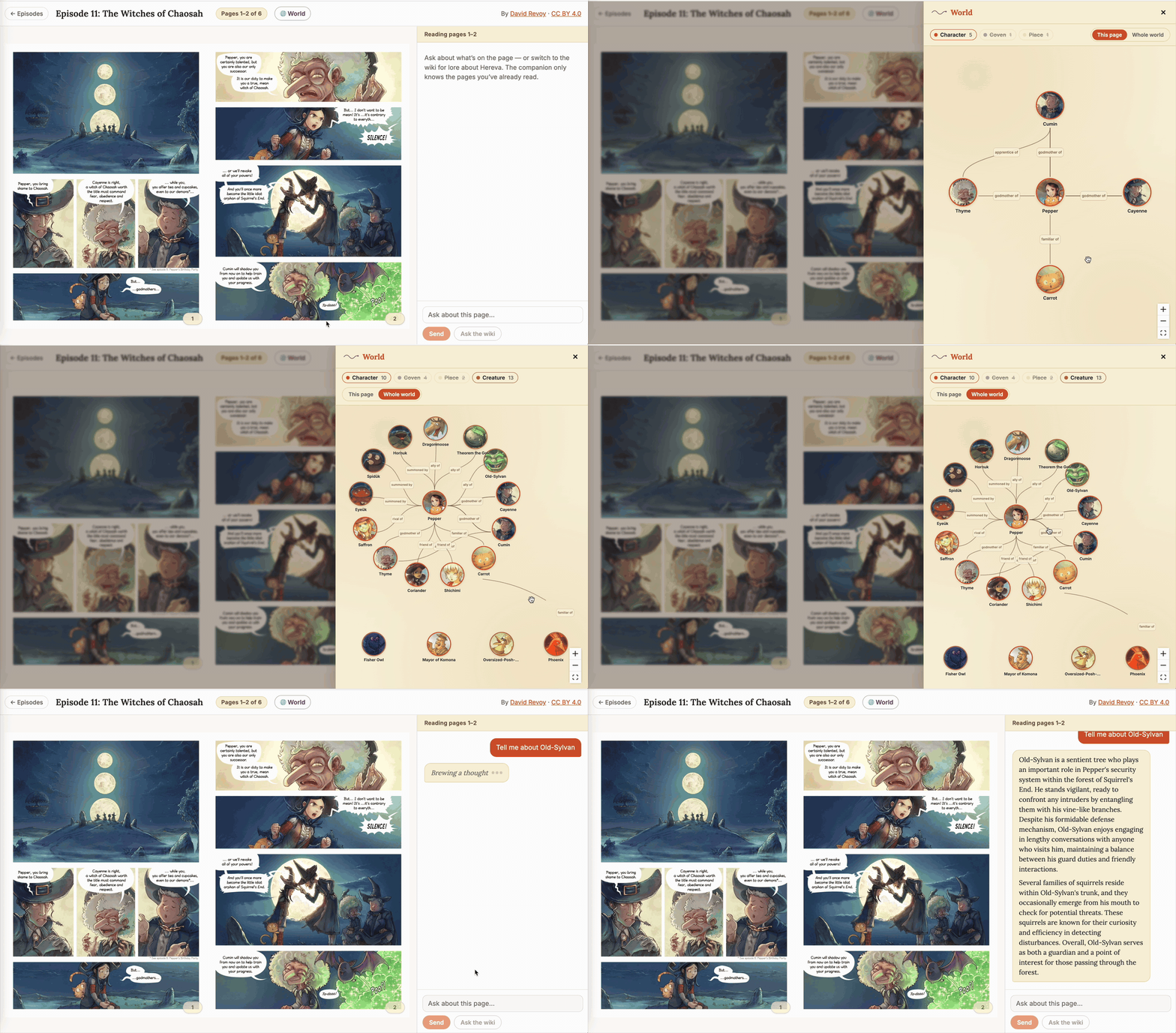
The end-to-end flow: open the World panel, click an avatar, click Ask in wiki mode, watch the typing indicator land in the chat panel while qwen2.5:7b warms up, then read the grounded summary stream in. Click the image to view full-size.
The connection is three lines of TSX:
1
2
3
4
// frontend/src/components/world-graph/InfoCard.tsx
<button onClick={() => onAskInWiki(entity.name)} className="info-card__ask">
  Ask in wiki mode →
</button>
1
2
3
4
5
6
7
8
// frontend/src/App.tsx — passed down to WorldGraphOverlay
onAskInWiki={(entityName) => {
  setWorldOpen(false);                            // close the overlay
  setOutboundQuestion({                           // new object identity fires the send
    mode: 'wiki',
    text: `Tell me about ${entityName}`,
  });
}}
The wire is short. What it lands on, though, is the entire wiki-mode RAG pipeline from Post 10, and that’s where this post’s third skill comes in.
The problem: small models drown in big wiki context
Post 10 shipped wiki mode against a hand-written wiki_seed.yaml: five articles, total under 4 KB. That worked for the five entities those articles covered. Post 12’s graph has 45 entities. The reader can now click any of them (Truffel, Camomile, Quassia, the Mayor, the Mayor’s three-line bio) and trigger a wiki-mode question about an entity the seed never covered.
The straightforward fix is to pull more wiki content. The framagit Pepper&Carrot wiki has a handful of long-form .md files: characters.md (32 KB, one ### Name section per character), creatures.md, places.md, magic-system.md, history.md, time-system.md, timeline.md. The new ingestion/wiki_scraper.py pulls them into data/raw/wiki-upstream/ in a single CLI run, and ingest_wiki.py already accepts both directories.
The first version of this pipeline embedded those articles whole — one Chroma chunk per file, top-5 retrieval. “Tell me about Truffel” landed characters.md in the retrieved set (Truffel has two paragraphs in there, near the end), but at top-5 it landed characters.md alongside creatures.md and places.md. qwen2.5:7b sees ~80 KB of mostly-unrelated bios and fabricates a backstory about Truffel that isn’t in any of them.
I tried paragraph-chunking next: split each .md on blank lines, embed each paragraph as its own Chroma row, lower the retrieval k to 3. That helped (characters.md became 130 small chunks; “Tell me about Truffel” pulled the right paragraph), but the model still leaked. The retrieved paragraphs are short, but the chat orchestrator fetches the whole article by source_id to feed the prompt, since that’s the contract the runtime resolver inherited from Post 10. Top-3 paragraphs from characters.md means the whole 32 KB file in the prompt. qwen2.5:7b doesn’t ignore the noise; it lets the unrelated bios bleed into Truffel’s answer.
You can stare at this for a while and reach for retrieval engineering: re-chunking, dynamic rerankers, a second-pass summarization at query time. All of it adds complexity at the runtime layer, which is exactly where the project has been keeping things plain. The real bug is asking the small model to do the filtering work upstream. The Post 11 prompt hardening (OUTPUT RULES, GROUNDING CONTRACT, the markdown-stripping safety net) only holds for context windows the model can actually attend to. A 32 KB wiki article isn’t one of those.
The fix: pre-filter the documents, not the retrieval
The runtime can only land what the index gives it, so change what the index has. Instead of embedding characters.md whole (or in 130 paragraph-shaped pieces), embed one ~150-word summary per entity, written ahead of time. Top-3 retrieval lands three focused summaries totaling ~500 words. qwen2.5:7b sees a context window it can actually keep at the top of its attention, and Post 11’s OUTPUT RULES apply cleanly.
Authoring 45 entity summaries + 5 topic summaries by hand is a lot of typing. So is keeping them in sync with the framagit wiki when David Revoy publishes another bio. So the workshop introduces a third Claude Code skill that does the typing:
1
2
3
4
5
6
7
8
9
# .claude/skills/summarize-wiki/SKILL.md (frontmatter abridged)
description: Author per-entity and per-topic wiki summaries from the
  upstream wiki sources. Reads data/raw/wiki/ (curated), data/raw/wiki-
  upstream/ (framagit), and data/world-graph/entities.yaml (the canonical
  entity list). Writes one tight focused summary per entity to
  data/wiki-summaries/entities/<slug>.md and a handful of non-entity
  topic summaries to data/wiki-summaries/topics/<slug>.md. These
  summaries — not the raw wiki articles — become the documents the wiki
  ingestion pipeline embeds.
The skill body walks Claude Code through six steps. Read the entity list. Read the source .md files. For each entity, find its source paragraphs in the appropriate file. Pick a length tier: ~300 words for major entities (Pepper, the godmothers, Saffron, the primary covens, Komona, Squirrel’s End, Hereva), ~100 words for everyone else. Write the summary in flowing prose, with no markdown headers, no bullets, no panel-by-panel structure (same anti-recitation discipline from the ingest-from-images and extract-world-graph skills; same reason: any markdown in the embedded document leaks into the chat answer). Frontmatter goes at the top with slug, title, category, and source_url. Validate by running the loader at the end.
One run of the skill produces a directory like this:
1
2
3
4
5
6
7
8
9
10
11
12
13
14
15
16
17
18
19
data/wiki-summaries/
├── entities/
│   ├── pepper.md            (~300 words, major)
│   ├── carrot.md            (~150 words)
│   ├── thyme.md             (~280 words, major)
│   ├── cayenne.md           (~280 words, major)
│   ├── cumin.md             (~280 words, major)
│   ├── saffron.md           (~290 words, major)
│   ├── shichimi.md          (~280 words, major)
│   ├── truffel.md           (~90 words, minor)
│   ├── mango.md             (~80 words, minor)
│   ├── apiaceae.md          (~100 words, minor)
│   └── …40 more
└── topics/
    ├── magic-system-overview.md
    ├── history-of-hereva.md
    ├── great-war.md
    ├── time-system.md
    └── chaosah-tradition.md
Each file looks like:
1
2
3
4
5
6
7
8
9
10
11
12
13
14
15
---
slug: truffel
title: Truffel
category: character
source_url: https://www.peppercarrot.com/en/wiki/Characters.html
---

Truffel is Saffron's familiar, a female white angora cat. She lives
with Saffron in the heart of Komona and travels with her wherever
Saffron goes. Her hobbies are sleeping and grooming. Truffel plays
with Pepper's cat Carrot whenever the two witches visit, which is one
of the small constants that keeps the rivalry between Pepper and
Saffron from drifting into outright hostility. Like Carrot she does
not speak and has no known magic of her own; she is a familiar in the
everyday sense, a constant companion rather than a magical instrument.
One chunk per summary
The wiki ingestion code shrinks rather than grows:
1
2
3
4
5
6
7
8
9
10
11
12
13
14
# ingestion/chroma_writer.py — paragraph chunking is gone
async def upsert_wiki_articles(self, articles: list[WikiArticle]) -> None:
    """Embed each wiki summary as a single document in `wiki_v1`."""
    if not articles:
        return
    ids = [str(a.id) for a in articles]
    texts = [format_wiki_for_embedding(a.title, a.content) for a in articles]
    metadatas = [{"source_table": "wiki", "source_id": str(a.id)} for a in articles]
    embeddings = await self._embedding.embed_batch(texts)

    collection = self.get_or_create_collection(WIKI_COLLECTION)
    for a in articles:
        collection.delete(where={"source_id": str(a.id)})
    collection.upsert(ids=ids, embeddings=embeddings, documents=texts, metadatas=metadatas)
One chunk per summary keeps the embedding signal concentrated. The Chroma wiki_v1 collection now holds 50 rows — one per .md file — instead of the 469 paragraph-chunks the previous design produced from 16 sprawling articles.
Before / after, on the same question
The change shows up plainly in qwen2.5:7b’s wiki answers. Same prompt, same chat orchestrator, same Post 11 prompt hardening — only the wiki index differs.
| Question | Before (raw articles, 469 paragraph chunks) | After (50 per-entity summaries, k=3) |
|---|---|---|
| Tell me about Truffel | Three meandering paragraphs that confuse Truffel with the broader catalog of Hereva creatures. | “Truffel is Saffron’s familiar, a female white angora cat. She lives with Saffron in the heart of Komona and travels with her wherever Saffron goes…” — grounded in the 90-word summary. |
| Tell me about Cayenne | “Cayenne is a type of red pepper used in cooking…” — the small model leaked culinary domain knowledge through a tenuous embedding match. | “Cayenne is the tall, thin, and rigid Chaosah witch who serves as Pepper’s spell-casting tutor and one of her three godmothers…” — grounded in the 280-word summary. |
| What is Magmah? | Vague summary that confuses Magmah with magma (the substance). | “Magmah is the school of cooking, baking, grilling, boiling, frying, steaming, and toasting, and also the house of alchemy and rare metals…” — grounded in the major-tier summary. |
The reading experience is what changed. Click Truffel’s avatar on the world-graph overlay, click Ask in wiki mode, and the answer that streams back is small, accurate, and warm in the project’s voice. Click the Cayenne avatar and the godmother’s bio streams in instead of an essay on cuisine. Click Magmah and the model knows it’s a school, not a substance.
Three skills, one pattern
With summarize-wiki in place, the workshop now has three Claude Code skills, each authoring a different durable artifact from the project’s source material:
| Skill | Reads | Writes | Why |
|---|---|---|---|
ingest-from-images (Post 5) | page images | data/raw/ep*/pages/page_*.json | The vision step is too tactile for a runtime call; better as durable JSON. |
extract-world-graph (Post 12) | wiki sources + page JSONs + image manifest | data/world-graph/entities.yaml + relationships.yaml | The entity list shouldn’t be re-derived per request; better as a hand-editable YAML. |
summarize-wiki (Post 12) | wiki sources + entity list | data/wiki-summaries/{entities,topics}/*.md | The retrieval index shouldn’t have to do disambiguation the small model can’t follow; better as pre-filtered documents. |
All three are one-shot authors of durable artifacts. Same architectural rationale every time: move the model touch to authoring time, where the artifact can be git diff-ed, hand-edited, and version-controlled, so the runtime never depends on a model call to be correct. The runtime is plain Postgres, plain Chroma, plain FastAPI, plain React.
The pattern is composable in a useful way too. The world graph defines what entities the reader can ask about; the summarize-wiki output is what the chat sees when they ask. Same source material (the wiki) flows into both, in two different shapes: one a graph of names, one a set of focused paragraphs. If David Revoy publishes a new bio tomorrow, you run the wiki scraper and re-trigger both skills, and the shipped runtime never noticed.
What’s Honest, What’s Open
Three things to name plainly, because portfolio posts that don’t are the ones that age badly.
The workshop graph at the post-12-13-worldgraph tag carries 45 entities and 57 relationships — the curated wiki plus the framagit scrape, cross-referenced against the page JSONs from ep01–ep12. The number isn’t sacred: a fresh clone with only ep01 ingested and only the curated wiki present will produce a much smaller graph (~10 entities) when you re-run the skill, and that’s the point. Coverage grows when the source material grows. If you scrape additional framagit pages, ingest more episodes, or hand-write a new bio into data/raw/wiki/, re-running the extract-world-graph skill will surface the additions in the YAML, with hand-tweaked layouts preserved (STEP 2a of the SKILL.md is non-negotiable about this).
The skill is “Layout idempotent, summary not idempotent.” STEP 2a of the SKILL.md is explicit: the skill must reuse hand-tweaked layout coordinates across re-runs. But summaries get re-authored every time the skill runs. If you’ve polished a summary line and want to keep it, commit the YAML and git diff after a re-run. The asymmetry is deliberate. Summaries are the part where the source material’s evolution should propagate (a fresh page-description might reveal a new fact), and layouts are the part where the human’s curation should dominate. Both are defensible; both are documented; neither is the “right” answer if your priorities differ.
Several entities are wiki-seeded with low confidence. Hereva is the world and is implicit everywhere but named explicitly in no locations_or_concepts list. The same is true for several covens (Aquah, Zombiah, Ah) and many of the bestiary creatures: they’re in the wiki sources but no ingest-from-images page JSON has yet pinned their first appearance. The skill defaults their debut to a sensible fallback ((1, 1) for foundational entities like Hereva and the four primary covens, or the wiki-pinned episode for those it knows about) and writes # confidence: low — defaulted next to each one. If you find a default aesthetically wrong, edit the YAML directly; the layout STEP 2a discipline means hand-edits survive re-runs.
Wiki coverage scales with two parallel knobs. The world graph (entity list, debut tuples, layout) and the wiki summaries (the per-entity .md documents the chat retrieves) are independent artifacts produced by two different skills from the same source material. Add a new bio to data/raw/wiki/, re-run extract-world-graph, and the new entity surfaces on the overlay. Re-run summarize-wiki and the new entity is also askable in wiki mode. Forget the second step and the avatar shows up but “Ask in wiki mode” returns a vague answer for the new node. The symptom is informative, and the fix is one CLI command.
The world-graph data model bridges, but doesn’t currently power, the chat. The world_entities.character_id foreign key links a world entity to the canonical character row, which means future chat features could use the graph to enrich answers (“who’s on this page?” → look up the page’s characters → look up each character’s member_of edges → mention what coven they belong to). The workshop doesn’t do this yet; the chat pipeline from Posts 9–11 retrieves from pages_v1 and wiki_v1 only. The current bridge from graph → chat is one-way (“Ask in wiki mode” sends a question; the chat doesn’t yet enrich answers with graph context). Wiring the graph into the chat is a natural follow-up; the workshop ships without it to keep the post’s scope on the overlay.
Key Takeaways
1. Skills are one-shot authors of durable artifacts. Same pattern as Post 5’s ingest-from-images: Claude Code reads source material, synthesizes structured data, validates against the loader’s contract, writes to disk. The runtime never calls a model to figure out who’s in the world or what to say about them; it queries Postgres and Chroma. The artifact is hand-editable, version-controlled, and stable across model versions. Skills are for first passes and source-material refreshes — once the artifact is good, subsequent fixes go directly into the file.
2. Spoiler safety is a row-value comparison. Post 9 expressed it as a Chroma where clause; Post 12 expresses it as tuple_(episode_debut, page_debut) <= cursor in SQL. Same lexicographic shape, different store. Postgres compares row values lexicographically by default; SQLAlchemy renders the expression cleanly. One operator, one expression, no OR-with-AND-shaped subtlety to typo.
3. Edges need their own debut filter. “Both endpoints visible” is not enough. An edge can carry plot meaning that debuts later than both of its endpoints: a rivalry revealed in ep15 between two ep1-debut witches must stay hidden until ep15. Filter the edge’s own debut AND require both endpoints to satisfy the same predicate. Three where clauses; all three mandatory; one test pins it explicitly because it’s the most plausible bug.
4. The pydantic loader is the contract. The skill imports the same EntityData / RelationshipData models the ingestion CLI uses. A misspelled slug fails fast at load time with a clear error, not at runtime as a missing-row 500. The contract isn’t a markdown spec; it’s a Python file that both authors and consumers import. Same shape applies to the wiki summaries — WikiArticleData is the pydantic contract summarize-wiki writes to and ingest_wiki.py reads.
5. Image scraping captures provenance, not just pixels. image_manifest.json records the framagit ref, the short SHA, the timestamp, and the lists of character/creature slugs that were on disk at that ref. The manifest is the seam between the scraper and the skill, and the audit trail for “where did these portraits come from?” It’s committed (small); the bytes aren’t (gitignored). Anyone running the project re-runs the scraper to populate them.
6. The frontend is small because the back end is structural. Eight components, ~900 lines of TSX, react-flow handling the canvas mechanics. The kind-grid focus-layout is 100 lines; the rest is mapping API rows to nodes and edges, picking handle sides per edge for cleaner bezier routing, and the fade-in diff. No node-positioning algorithm beyond focus mode’s kind-grid; no edge-routing math beyond “horizontal pair → right→left, vertical pair → top→bottom”; no graph-state library. The only state the component owns is selectedNodeId, the active-kind set, the mode, and the fade-in diff, and the viewport auto-fits on every node-set change so neither focus nor full mode strands entities off-screen at a fixed default zoom.
7. Two views, one boundary. Focus mode (“This page”) and full mode (“Whole world”) layer on top of the same spoiler-filtered SELECT: the focus seed joins page_characters to find who’s drawn on the visible spread, then expands one hop via the structural edge kinds (member_of, lives_in, familiar_of). Same boundary; same row-value comparison; different scoping.
8. Animate when it carries information. First render is silent; new debuts after a page flip fade in. The animation isn’t decoration — it draws the reader’s eye to the change, which is exactly the affordance a spoiler-revealing graph wants. CSS @keyframes driven by a one-render class is enough; no animation library required. The diff is O(n) over a set, and the animation is GPU-cheap. Edge selection is the same idea: neutral by default, kind-colored on focus, with a 180 ms transition so the reader’s eye catches what just lit up.
9. Skill-as-author scales, runtime-extraction doesn’t. A runtime model call per overlay open would be: a service to scale, a cost per visit, a model whose drift can quietly break the graph. The skill pattern moves all of that to authoring time. You can git diff the YAML, hand-edit it, and re-run a 1-second ingest. The model touches the artifact at authoring time; the artifact touches the runtime.
10. When the model is too small, shrink the documents, not the prompt. Post 11’s OUTPUT RULES work against a 600-word context window. They don’t work against 30 KB of multi-entity wiki articles, no matter how the prompt is reworded. The summarize-wiki skill responds by pre-filtering the documents themselves: one tight ~150-word summary per entity, one Chroma chunk per summary, top-3 retrieval landing ~500 words. The cheap fixes (bigger model, more retrieval engineering, better prompts) all assume the runtime should keep doing the disambiguation work. The actual fix is to give the small model a small problem.
Next up: Post 14 — Going to Production: Provisioning Modal, Neon, and R2. The flipbook, the chat, and the world graph all run beautifully on your laptop. Post 14 starts taking the same architecture to the internet: Modal for the GPU-served Ollama, Neon for managed Postgres, and Cloudflare R2 for the image bytes. The seam each provider abstraction from Post 4 was designed for finally pays off.
The workshop starter that backs this post is at https://github.com/bearbearyu1223/pepper-carrot-companion-workshop, tagged post-12-13-worldgraph — git checkout post-12-13-worldgraph to get exactly the code shown here. The full source repository and the public live-demo URL go up alongside the deploy guide near the end of the series.
Pepper & Carrot is © David Revoy, licensed CC BY 4.0. All credit to him for the source material that made this project possible.
All opinions expressed are my own.